
How To Use This Manual
Consult the Table of Contents to determine which section contains the information you desire.
Since the specification of your vehicle depends on the items of equipment ordered, certain descriptions and illustrations may differ from your vehicle’s equipment.
The detailed index at the back of this Owner’s Manual contains a complete listing of all subjects.
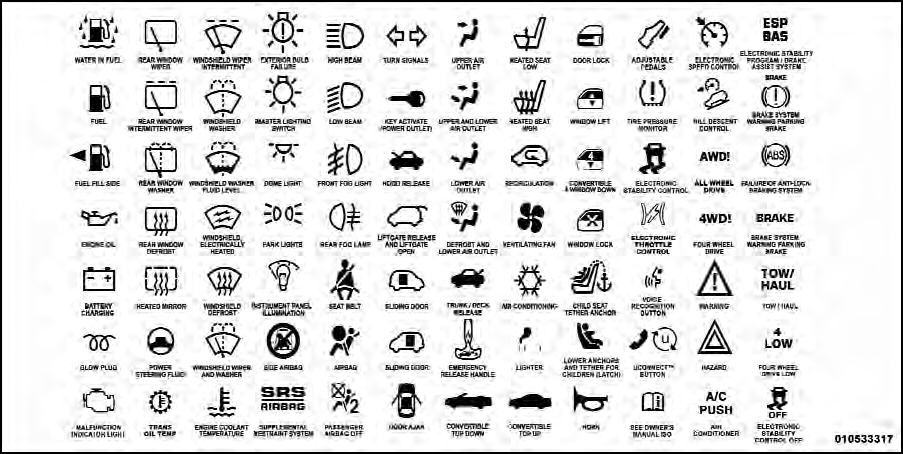
Consult the following table for a description of the symbols that may be used on your vehicle or throughout this Owner’s Manual:
See also:
Grocery Bag Hooks
The rear cargo area is equipped with grocery bag hooks,
located on either side of the rear cargo area.
Grocery Bag Hooks ...
Electronic Vehicle Information Center (EVIC) — If Equipped
The Electronic Vehicle Information Center (EVIC) features
a driver-interactive display that is located in the
instrument cluster.
Electronic Vehicle Information Center (EVIC)
The EVIC consists ...
To Resume Speed
To resume a previously set speed, push the RES (+)
button and release. Resume can be used at any speed
above 20 mph (32 km/h). ...