
Supplemental Side Air Bag Inflatable Curtain (SABIC)
SABIC air bags may offer side-impact protection to front and rear seat outboard occupants in addition to that provided by the body structure. Each air bag features inflated chambers placed adjacent to the head of each outboard occupant that reduce the potential for sideimpact head injuries. The SABIC deploy downward, covering both windows on the impact side.
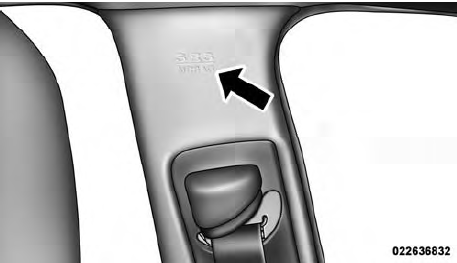
Supplemental Side Air Bag Inflatable Curtains (SABIC) Label Location
NOTE:
• Air Bag covers may not be obvious in the interior trim,
but they will open during air bag deployment.
• Being too close to the side air bags during deployment
could cause you to be severely injured or killed.
The system includes side impact sensors that are calibrated to deploy the side air bags during impacts that require air bag occupant protection.
WARNING!
• Your vehicle is equipped with left and right
Supplemental Side Air Bag Inflatable Curtain
(SABIC), do not stack luggage or other cargo up
high enough to block the location of the SABIC.
The area where the SABIC is located should remain
free from any obstructions.
• Do not use accessory seat covers or place objects
between you and the side air bags; the performance
could be adversely affected and/or objects
could be pushed into you, causing serious injury.
See also:
Help Command
If you need assistance at any prompt, or if you want to
know your options at any prompt, say “Help” following
the beep.
To activate the Uconnect™ Phone from idle, simply press
the button ...
Enabling And Disabling Parksense
ParkSense can be enabled and disabled using the
Uconnect Touch™ System. The available choices are: Off,
Sound Only, or Sound and Display. Refer to “Uconnect
Touch™ Settings” in “Unders ...
Controlling The iPod Or External USB Device Using Radio Buttons
To get into the iPod /USB/MP3 control mode and access
a connected audio device, either press the “AUX” button
on the radio faceplate or press the VR button and say
USB or Switch to USB . Onc ...