
Transmitter Battery Replacement
The recommended replacement battery is one CR2032 battery.
NOTE:
• Perchlorate Material — special handling may apply.
See www.dtsc.ca.gov/hazardouswaste/perchlorate
• Do not touch the battery terminals that are on the back
housing or the printed circuit board.
1. Remove the emergency key by sliding the mechanical latch on the back of the RKE transmitter sideways with your thumb and then pull the key out with your other hand.
2. Insert the tip of the emergency key or a #2 flat blade screwdriver into the slot and gently pry the two halves of the RKE transmitter apart. Make sure not to damage the seal during removal.
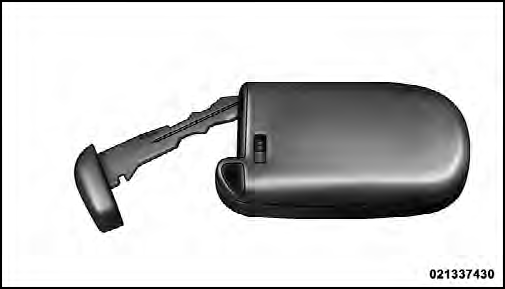
3. Remove the battery by turning the back cover over (battery facing downward) and tapping it lightly on a solid surface such as a table or similar, then replace the battery. When replacing the battery, match the + sign on the battery to the + sign on the inside of the battery clip, located on the back cover. Avoid touching the new battery with your fingers. Skin oils may cause battery deterioration. If you touch a battery, clean it with rubbing alcohol.
4. To assemble the RKE transmitter case, snap the two halves together.
See also:
Jacking Instructions
WARNING!
Carefully follow these tire changing warnings to
help prevent personal injury or damage to your
vehicle:
• Always park on a firm, level surface as far from
the edge of the roadway a ...
Automatic Temperature Control (ATC) — If Equipped
• Front Three-Zone ATC allows both driver and front
passenger seat occupant, and rear seat occupants to
select individual comfort settings.
• When occupants in the vehicle select the AUTO mod ...
Loose Fuel Filler Cap Message
If the vehicle diagnostic system determines that the fuel
filler cap is loose, improperly installed, or damaged, a
“gASCAP” message will display in the odometer or a
“CHECK GASCAP” messa ...