
Automatic Headlights — If Equipped
Turning the end of the multifunction lever to the third detent (AUTO), will activate the automatic headlight system.
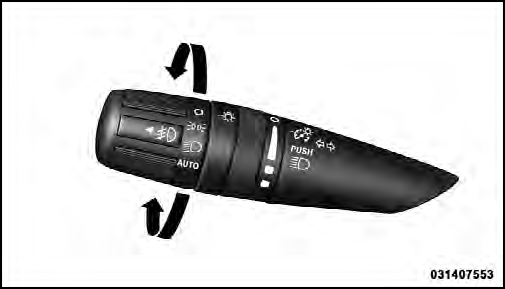
Headlight Switch
With the engine running and the multifunction lever in the AUTO position, the headlights will turn on and turn off based on the surrounding light levels.
See also:
Reset
• press the button.
• After the “Ready” prompt, and the following beep, say
“Setup”, then “Reset”.
This will delete all phone pairing, phone book entries,
and other settings in ...
Reclining The Seatback
The angle of the seatback can be adjusted forward or
rearward. Push the seatback switch forward or rearward,
the seat will move in the direction of the switch. Release
the switch when the desire ...
Tire And Loading Information Placard
Tire and Loading Information Placard
This placard tells you important information about the:
1) number of people that can be carried in the vehicle
2) total weight your vehicle can carry
3) t ...