
Play Video Games
Connect the video game console to the Auxiliary RCA input jacks (1 set or 2 depending on vehicle) located on the back of the center console or on left side behind the second row seat.
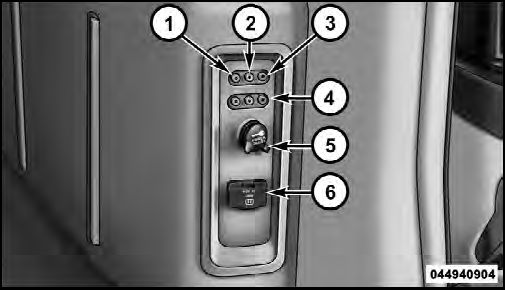
1. Video In – Yellow
2. Left Audio In – White
3. Right Audio In – Red
4. AUX 2 Inputs (If Equipped)
5. Power Outlet
6. Power Inverter
When connecting an external source to the AUX input, be sure to follow the standard color coding for the VES™ jacks:
NOTE:
Certain high-end video games, such as Playstation3
and XBox360 will exceed the power limit of the
vehicle’s Power Inverter. Refer to the Power Inverter
section in your vehicle’s Owner’s Manual for more
information.
Ensure the Remote Control and Headphone switch is on Channel 1.
See also:
General Information
This device complies with FCC rules Part 15 and Industry
Canada RSS-210. Operation is subject to the following
two conditions:
1. This device may not cause harmful interference.
2. This device m ...
Unwired Stereo Headphone Lifetime Limited Warranty
Who Does This Warranty Cover? This warranty covers
the initial user or purchaser ( you or your ) of this
particular Unwired Technology LLC ( Unwired ) wireless
headphone ( Product ). The warrant ...
TUNE Control (Rotary)
Turn the rotary TUNE/SCROLL control knob clockwise
to increase or counterclockwise to decrease the channel. ...