
Electronic Vehicle Information Center (EVIC)
The Electronic Vehicle Information Center (EVIC) features a driver-interactive display that is located in the instrument cluster.
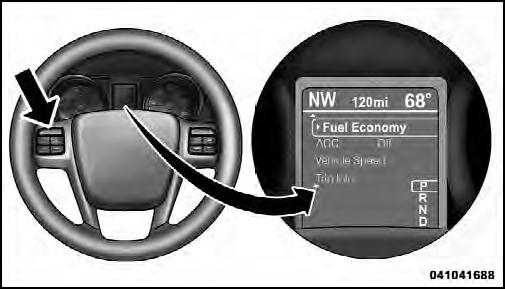
Electronic Vehicle Information Center (EVIC)
This system allows the driver to select a variety of useful
information by pressing the switches mounted on the
steering wheel. The EVIC consists of the following:
• Radio Info
• Fuel Economy Info
• Cruise Control Info
• Digital Vehicle Speed
• Trip Info
• Tire Pressure
• Vehicle Info
• Stored Warning Messages
• Turn Menu OFF
The system allows the driver to select information by pressing the following buttons mounted on the steering wheel:

EVIC Steering Wheel Buttons
UP Button

Press and release the UP button to scroll upward through the main menu and Vehicle Info and Trip Info sub-menus (Fuel Economy, Vehicle Info, Tire PSI, Cruise, Messages, Trip Info, Vehicle Speed, and Turn Menu OFF) and sub-menus.
DOWN Button

Press and release the DOWN button to scroll downward through the main menu and Vehicle Info and Trip Info sub-menus (Fuel Economy, Vehicle Info, Tire PSI, Cruise, Messages, Trip Info, Vehicle Speed, and Turn Menu OFF) and sub-menus.
SELECT Button

Press and release the SELECT button to access the information screens or sub-menu screens of a main menu item. Press and hold the SELECT button for two seconds to reset displayed/ selected features that can be reset.
BACK Button

Press the BACK button to return to the main menu from an info screen or sub-menu item.
See also:
Key-Off Power Delay
When this feature is selected, the power window
switches, radio, Uconnect™ phone (if equipped), DVD
video system (if equipped), power sunroof (if equipped),
and power outlets will remain activ ...
Auto Unlock On Exit
The doors will unlock automatically on vehicles with
power door locks if:
1. The Automatic Unlock Doors On Exit feature is enabled.
2. The transmission was in gear and the vehicle speed
returned ...
Inside Day/Night Mirror
A two-point pivot system allows for horizontal and
vertical mirror adjustment. Adjust the mirror to center on
the view through the rear window.
Headlight glare can be reduced by moving the small ...