
Instrument Panel Features
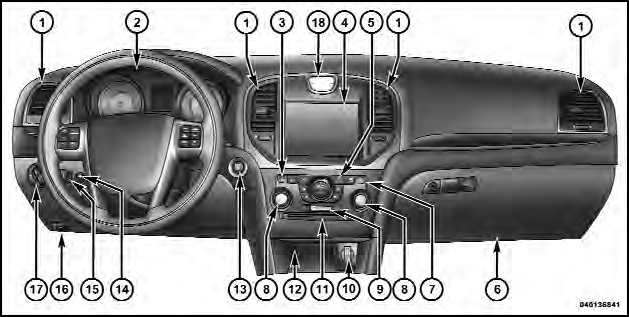
Instrument Panel Features
1 — Air Outlet
2 — Instrument Cluster
3 — Hazard Switch
4 — Uconnect Touch™ System
5 — Climate Control Hard Controls
6 — Glove Compartment
7 — ESC Off Switch
8 — Uconnect Touch™ System Hard Controls
9 — SD Memory Card Slot
10 — Power Outlet
11 — CD/DVD Slot
12 — Storage Compartment
13 — Engine Start/Stop Button
14 — Trunk Release Button
15 — Dimmer Controls
16 — Hood Release
17 — Headlight Switch
18 — Analog Clock
See also:
Driver And Passenger Advanced Front Air Bag Inflator Units
The Driver and Passenger Advanced Front Air Bag
Inflator Units are located in the center of the steering
wheel and on the right side of the instrument panel.
When the ORC detects a collision requ ...
Interior Care
Use MOPAR Fabric Cleaner or equivalent to clean fabric
upholstery and MOPAR Carpet Cleaner or equivalent
for carpeting.
Interior Trim should be cleaned starting with a damp
cloth, or MOPAR Sati ...
Coolant Level
The coolant bottle provides a quick visual method for
determining that the coolant level is adequate. With the
engine cold, the level of the engine coolant (antifreeze) in
the coolant recovery b ...