
Transmitter Battery Replacement
The recommended replacement battery is one CR2032 battery.
NOTE:
• Perchlorate Material — special handling may apply.
See www.dtsc.ca.gov/hazardouswaste/perchlorate
• Do not touch the battery terminals that are on the back
housing or the printed circuit board.
1. Remove the emergency key by sliding the mechanical latch on the back of the RKE transmitter sideways with your thumb and then pull the key out with your other hand.
2. Insert the tip of the emergency key or a #2 flat blade screwdriver into the slot and gently pry the two halves of the RKE transmitter apart. Make sure not to damage the seal during removal.
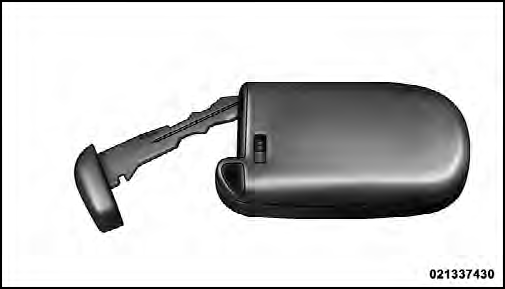
3. Remove the battery by turning the back cover over (battery facing downward) and tapping it lightly on a solid surface such as a table or similar, then replace the battery. When replacing the battery, match the + sign on the battery to the + sign on the inside of the battery clip, located on the back cover. Avoid touching the new battery with your fingers. Skin oils may cause battery deterioration. If you touch a battery, clean it with rubbing alcohol.
4. To assemble the RKE transmitter case, snap the two halves together.
See also:
Personal Settings (Customer-Programmable Features)
Personal Settings allows the driver to set and recall
features when the automatic transaxle is in PARK.
Press and release the MENU button until “Personal
Settings” displays in the EVIC.
Pres ...
Flowing/Rising Water
WARNING!
Do not drive on or across a road or path where water
is flowing and/or rising (as in storm run-off). Flowing
water can wear away the road or path’s surface
and cause your vehicle to ...
Maintenance Procedures
The pages that follow contain the required maintenance
services determined by the engineers who designed your
vehicle.
Besides those maintenance items specified in the fixed
maintenance schedul ...