
Using The Remote Control
1. Press the MODE button on the Remote Control.
2. While looking at Screen 1 or 2, highlight VES DISC by either pressing Up/Down/Left/Right buttons or by repeatedly pressing the MODE button, then press ENTER on the Remote Control.
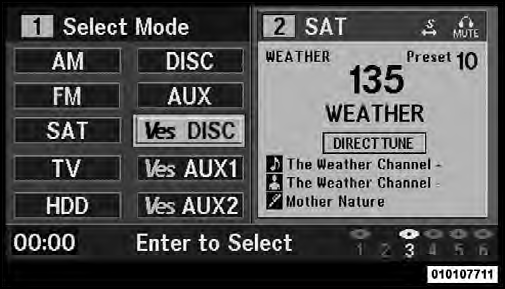
Select VES DISC Mode On The VES Screen
NOTE:
• Channel/Screen 1 select mode information is shown
on the left side of the screen.
• Channel/Screen 2 select mode information is shown
on the right side of the screen.
• The VES™ will retain the last setting when turned off.
See also:
Reformulated Gasoline
Many areas of the country require the use of cleaner
burning gasoline referred to as “Reformulated Gasoline.”
Reformulated gasoline contains oxygenates and are specifically
blended to reduce ...
REVERSE
This range is for moving the vehicle backward. Shift into
REVERSE only after the vehicle has come to a complete
stop. ...
Display
Other Language Setup
DVD Player Language Menu
All of the Language settings have a special Other setting to
accommodate languages other than Japanese or English.
These languages are selected usi ...