
Play Video Games
Connect the video game console to the Auxiliary RCA input jacks (1 set or 2 depending on vehicle) located on the back of the center console or on left side behind the second row seat.
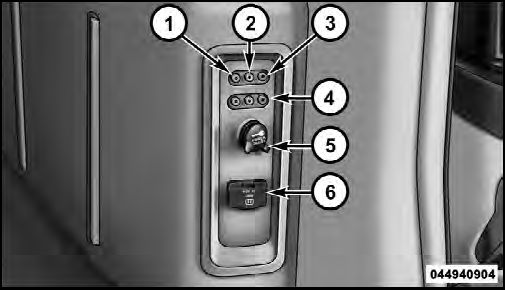
1. Video In – Yellow
2. Left Audio In – White
3. Right Audio In – Red
4. AUX 2 Inputs (If Equipped)
5. Power Outlet
6. Power Inverter
When connecting an external source to the AUX input, be sure to follow the standard color coding for the VES™ jacks:
NOTE:
Certain high-end video games, such as Playstation3
and XBox360 will exceed the power limit of the
vehicle’s Power Inverter. Refer to the Power Inverter
section in your vehicle’s Owner’s Manual for more
information.
Ensure the Remote Control and Headphone switch is on Channel 1.
See also:
Key Ignition Park Interlock
This vehicle is equipped with a Key Ignition Park Interlock
which requires the shift lever to be placed in PARK
before the engine can be turned off. This helps the driver
avoid inadvertently lea ...
Shallow Standing Water
Although your vehicle is capable of driving through
shallow standing water, consider the following Caution
and Warning before doing so.
CAUTION!
• Always check the depth of the standing water ...
Linking And Unlinking The Remote Keyless Entry Transmitter To Memory
Your RKE transmitters can be programmed to recall one
of two pre-programmed memory profiles by pressing the
UNLOCK button on the RKE transmitter.
To program your RKE transmitters, perform the fol ...