
Connecting The iPod Or External USB Device
Use the connection cable to connect an iPod or external USB device to the vehicle’s USB connector port which is located in the glove compartment.
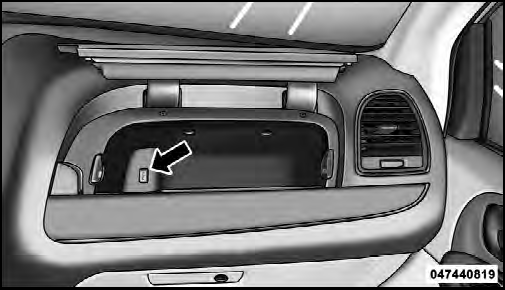
USB Connector Port
NOTE:
The glove compartment will have a position
where the iPod or consumer electronic audio device
cable can be routed through without damaging the cable
when closing the lid. This allows routing of the cable
without damaging it while closing the lid. If a cut out is
not available in the glove compartment, route the cable
away from the lid latch and in a place that will allow the
lid to close without damaging the cable.
Once the audio device is connected and synchronized to the vehicle’s iPod /USB/MP3 control system (iPod or external USB device may take a few minutes to connect), the audio device starts charging and is ready for use by pressing radio switches, as described below.
NOTE:
If the audio device battery is completely discharged,
it may not communicate with the iPod /USB/
MP3 control system until a minimum charge is attained.
Leaving the audio device connected to the iPod /USB/ MP3 control system may charge it to the required level.
See also:
Styling Changes: More Effective than on the Sedan
Seeing it in the metal for the first time, we formed our initial reaction
that the 200’s new front and rear styling improve the convertible’s appearance
even more than the sedan’s, the latte ...
Sunglass Bin Door
At the front of the console a compartment is provided for
the storage of a pair of sunglasses. The storage compartment
access is a “push/push” design. Push the chrome
pad on the door to open ...
Gross Combination Weight Rating (GCWR)
The GCWR is the total permissible weight of your vehicle
and trailer when weighed in combination.
NOTE:
The GCWR rating includes a 150 lbs (68 kg)
allowance for the presence of a driver. ...