
Compass Variance
Compass Variance is the difference between Magnetic North and Geographic North. To compensate for the differences the variance should be set for the zone where the vehicle is driven, per the zone map. Once properly set, the compass will automatically compensate for the differences, and provide the most accurate compass heading. For the most accurate compass performance, the compass must be set using the following steps.
NOTE:
Keep magnetic materials away from the top of
the instrument panel, such as iPod’s, Mobile Phones,
Laptops and Radar Detectors. This is where the compass
module is located, and it can cause interference with the
compass sensor, and it may give false readings.
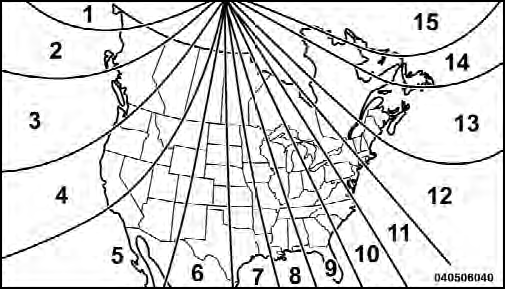
Compass Variance Map
1. Turn the ignition switch ON.
2. Press the UP or DOWN button until the Setup (Customer-Programmable Features) menu is reached, then press the SELECT button.
3. Press the DOWN button until the “Compass Variance” message is displayed in the EVIC, then press the SELECT button. The last variance zone number displays in the EVIC.
4. Press and release the SELECT button until the proper variance zone is selected, according to the map.
5. Press and release the RETURN button to exit.
See also:
Phone/Bluetooth
After pressing the Phone/Bluetooth soft-key the following
settings will be available.
• Paired Devices
This feature shows which phones are paired to the
Phone/Bluetooth system. For further inf ...
To Arm The System
1. Remove the keys from the ignition switch and get out
of the vehicle.
2. Lock the door using either the power door lock switch
(one door must be open) or the LOCK button on the
Remote Keyless ...
Fuel Filler Cap (Gas Cap)
The gas cap is behind the fuel filler door, on the left rear
quarter panel of the vehicle. If the gas cap is lost or
damaged, be sure the replacement cap is for use with this
vehicle.
Fuel Fi ...