
Electronic Vehicle Information Center (EVIC) — If Equipped
The Electronic Vehicle Information Center (EVIC) features a driver-interactive display that is located in the instrument cluster.
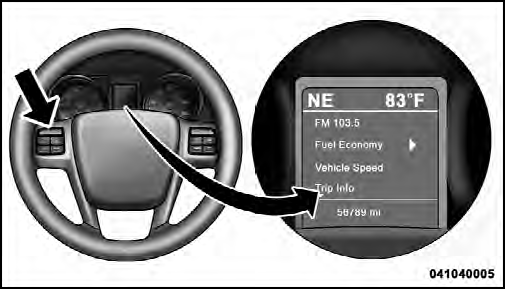
Electronic Vehicle Information Center (EVIC)
This system conveniently allows the driver to select a
variety of useful information by pressing the switches
mounted on the steering wheel. The EVIC consists of the
following:
• Radio Information
• Fuel Economy
• Vehicle Speed
• Trip Info
• Tire PSI
• Vehicle Info
• Messages
• Units
• System Setup (Personal Settings)
• Turn Menu Off
The system allows the driver to select information by pressing the following buttons mounted on the steering wheel:

EVIC Steering Wheel Buttons
UP Button

Press and release the UP button to scroll upward through the main menus (Fuel Economy, Vehicle Info, Tire PSI, Cruise, Messages, Units, System Setup) and sub-menus.
DOWN Button

Press and release the DOWN button to scroll downward through the main menus and submenus.
SELECT Button

The SELECT button allows access to information in EVIC submenus, selects some feature settings, and resets some EVIC features. The EVIC prompts the driver when the SELECT button can be used by displaying the right arrow graphic.
BACK Button

Press the BACK button to scroll back to a previous menu or sub-menu.
See also:
Vacation Storage
Any time you store your vehicle or keep it out of service
(i.e., vacation) for two weeks or more, run the air
conditioning system at idle for about five minutes in the
fresh air and high blower ...
Vehicle Modifications/Alterations
WARNING!
Any modifications or alterations to this vehicle could
seriously affect its roadworthiness and safety and
may lead to a accident resulting in serious injury or
death. ...
Tire PSI
Press and release the UP or DOWN button until Tire PSI
is highlighted in the EVIC. Press and release the SELECT
button and one of the following will be displayed:
• If tire pressure is OK for ...