
Power Mirrors
The power mirror controls are located on the driver’s door trim panel.
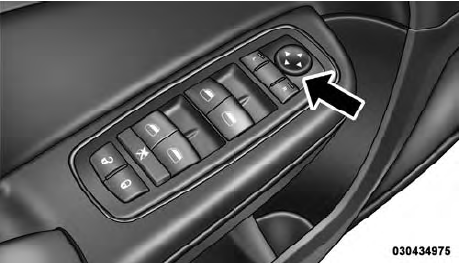
Power Mirror Control
The power mirror controls consist of mirror select buttons and a four-way mirror control switch. To adjust a mirror, press either the L (left) or R (right) button to select the mirror that you want to adjust.
NOTE:
A light in the select button will illuminate
indicating the mirror is activated and can be adjusted.
Using the mirror control switch, press on any of the four arrows for the direction that you want the mirror to move.
Power mirror preselected positions can be controlled by the optional Memory Seat Feature. Refer to “Driver Memory Seat” in “Understanding The Features Of Your Vehicle” for further information.
See also:
Forward Collision Warning — If Equipped
Forward Collision Warning (FCW) warns the driver of a
potential collision with the vehicle in front of you and
prompts the driver to take action in order to avoid the
collision.
FCW monitors th ...
Maintenance-Free Battery
Your vehicle is equipped with a maintenance-free battery.
You will never have to add water, nor is periodic maintenance
required.
NOTE:
The battery is stored in a compartment behind
the left fr ...
Disc
To switch to the disc mode, say “Disc”. In this mode, you
may say the following commands:
• “Track” (#) (to change the track)
• “Next Track” (to play the next track)
• “Pre ...