
Preparations For Jump-Start
The battery in your vehicle is located between the left front headlight assembly and the left front wheel splash shield. To allow jump-starting there are remote battery posts located on the left side of the engine compartment.
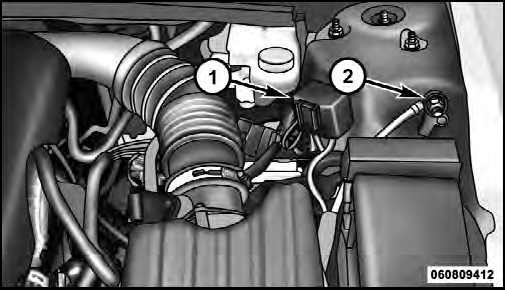
Remote Battery Posts
1 — Remote Positive (+) Post (covered with protective cap)
2 — Remote Negative (-) Post
WARNING!
• Take care to avoid the radiator cooling fan whenever
the hood is raised. It can start anytime the
ignition switch is on. You can be injured by
moving fan blades.
• Remove any metal jewelry such as watch bands or bracelets that might make an inadvertent electrical contact. You could be seriously injured.
• Batteries contain sulfuric acid that can burn your skin or eyes and generate hydrogen gas which is flammable and explosive. Keep open flames or sparks away from the battery.
1. Set the parking brake, shift the automatic transmission into PARK and turn the ignition to LOCK.
2. Turn off the heater, radio, and all unnecessary electrical accessories.
3. Remove the protective cover over the remote positive (+) battery post. To remove the cover, press the locking tab and pull upward on the cover.
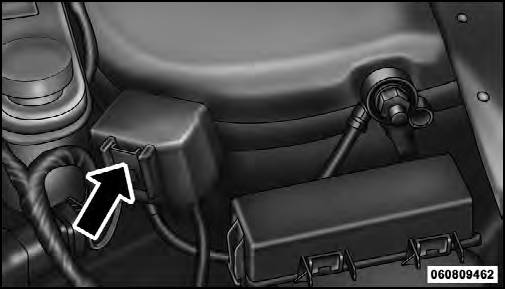
Locking Tab
4. If using another vehicle to jump-start the battery, park the vehicle within the jumper cables reach, set the parking brake and make sure the ignition is OFF.
WARNING!
Do not allow vehicles to touch each other as this
could establish a ground connection and personal
injury could result.
See also:
Synchronizing ESC
If the power supply is interrupted (battery
disconnected or discharged), the “ESC
Activation/Malfunction Indicator Light” may
illuminate with the engine running. If this
should occur, tu ...
To Vary The Speed Setting
There are two ways to change the set speed:
• Use the accelerator pedal to adjust the vehicle to the
desired speed and press the SET - button.
• Tap the RES + or SET - button to increase or de ...
Rating and Password Setup
The Rating and Password settings work together to control
the types of DVDs that your family watches. Most DVDVideo
discs have a rating (from 1 to 8) assigned to them
where lower numbers are des ...