
Fuel Filler Cap (Gas Cap)
The gas cap is behind the fuel filler door, on the left rear quarter panel of the vehicle. If the gas cap is lost or damaged, be sure the replacement cap is for use with this vehicle.
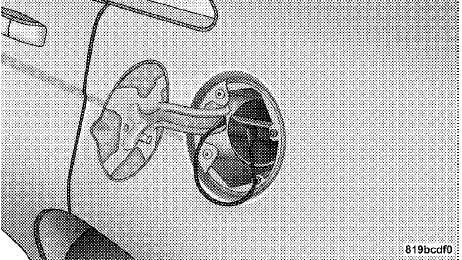
Fuel Filler Door
After removing the gas cap, place the gas cap tether cable over a hook on the inside of the fuel door. This keeps the gas cap suspended away from and protects the vehicle’s surface.
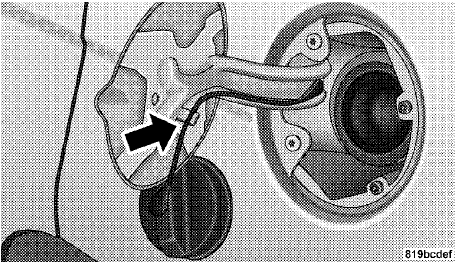
Tether Cable
NOTE:
If the gas cap is lost or damaged, be sure the
replacement cap is for use with this vehicle.
CAUTION!
• Damage to the fuel system or emission control
system could result from using an improper fuel
tank filler tube cap (gas cap).
• A poorly fitting gas cap may cause the “Malfunction Indicator Light (MIL)” to turn on.
• To avoid fuel spillage and overfilling, do not “top off” the fuel tank after filling. When the fuel nozzle “clicks” or shuts off, the fuel tank is full.
WARNING!
• Never have any smoking materials lit in or near
the vehicle when the gas cap is removed or the
tank is being filled.
• Never add fuel when the engine is running. This is in violation of most state and federal fire regulations and doing so may cause the MIL to turn on.
• A fire may result if gasoline is pumped into a portable container that is inside of a vehicle. You could be burned. Always place gas containers on the ground while filling.
NOTE:
• Tighten the gas cap until you hear a “clicking” sound.
This is an indication that the gas cap is tightened properly. The MIL in the instrument cluster may turn on if the gas cap is not secured properly. Make sure that the gas cap is tightened each time the vehicle is refueled.
• When the fuel nozzle “clicks” or shuts off, the fuel tank is full.
See also:
Open Air Driving in 30 Seconds Flat
On both soft and hard tops, the easy-to-use power convertible top folds in
three sections and automatically latches. Owners can drop the top with a switch
on the instrument panel, or with the pres ...
Cleaning Headlights
Your vehicle has plastic headlights that are lighter and
less susceptible to stone breakage than glass headlights.
Plastic is not as scratch resistant as glass and therefore
different lens cleani ...
Instrument Cluster Messages
Messages will be displayed in the instrument cluster to
alert the driver when certain unusual conditions occur.
These messages are described below.
...