
Lumbar Support — If Equipped
This feature allows you to increase or decrease the amount of lumbar support. The control lever is located on the outboard side of the driver’s seatback. Turn the control lever downward to increase and upward to decrease the desired amount of lumbar support.
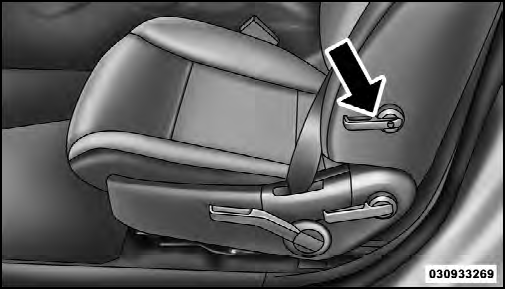
Lumbar Support
See also:
To Enter The Vehicle After Remote Start
To enter the vehicle while the engine is running during a
Remote Start, you must first unlock the vehicle using the
UNLOCK button on the RKE transmitter. After the
vehicle is unlocked, you can e ...
Pinch Protect Override
If a known obstruction (ice, debris, etc.) prevents closing
the sunroof, press the switch forward and hold for two
seconds after the reversal occurs. This allows the sunroof
to move toward the c ...
Required Maintenance Intervals
Refer to the Maintenance Schedules on the following
pages for the required maintenance intervals.
WARNING!
• You can be badly injured working on or around a ...