
Adjustable Pedals — If Equipped
The adjustable pedals system is designed to allow a greater range of driver comfort for steering wheel tilt and seat position. This feature allows the brake, accelerator, and clutch pedals (if equipped) to move toward or away from the driver to provide improved position with the steering wheel.
The switch is located on the left side of the steering column.
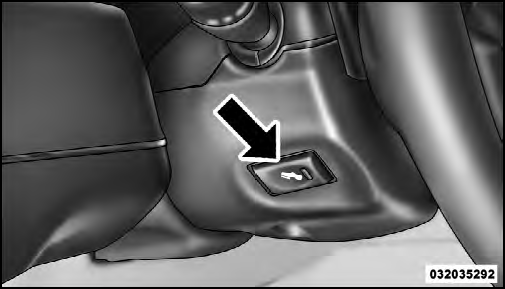
Adjustable Pedal Switch
Press the switch forward to move the pedals forward (toward the front of the vehicle).
Press the switch rearward to move the pedals rearward (toward the driver).
• The pedals can be adjusted with the ignition OFF.
• The pedals cannot be adjusted when the vehicle is in REVERSE or when the Electronic Speed Control System is on. The following messages will be displayed on vehicles equipped with the Electronic Vehicle Information System (EVIC) if the pedals are attempted to be adjusted when the system is locked out (“Adjustable Pedal Disabled — Cruise Control Engaged” or “Adjustable Pedal Disabled — Vehicle In Reverse”.
CAUTION!
Do not place any article under the adjustable pedals
or impede its ability to move, as it may cause damage
to the pedal controls. Pedal travel may become limited
if movement is stopped by an obstruction in the
adjustable pedal’s path.
WARNING!
Do not adjust the pedals while the vehicle is moving.
You could lose control and have an accident. Always
adjust the pedals while the vehicle is parked.
See also:
Reformulated Gasoline
Many areas of the country require the use of cleaner
burning gasoline referred to as “Reformulated Gasoline.”
Reformulated gasoline contains oxygenates and are specifically
blended to reduce ...
Easy Entry Second Row
The second row Stow ’n Go seats allow easy entry to the
third row seat or rear cargo area.
Pull up on the seatback recliner lever on the outboard
side of the seat.
Seatback Recliner Lever, S ...
Third Row Swivel Screen (If Equipped)
• The third row screen or Screen 2 has the ability to
lower and swivel to face forward.
• While the swivel screen is facing forward, the second
row screen or Screen 1 must be fully open in or ...