
Adaptive Cruise Control (ACC) Operation
The speed control buttons (located on the right side of the steering wheel) operates the ACC system.
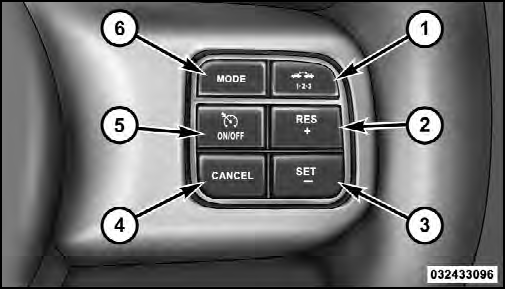
1 — DISTANCE SETTING
2 — RES +
3 — SET -
4 — CANCEL
5 — ON/OFF
6 — MODE
NOTE:
Any chassis/suspension modifications to the
vehicle will effect the performance of the Adaptive Cruise
Control.
See also:
Before You Begin Programming HomeLink
Be sure that your vehicle is parked outside of the garage
before you begin programming.
For more efficient programming and accurate transmission
of the radio-frequency signal it is recommended th ...
Transfer Call To And From Mobile Phone
The Uconnect™ Phone allows ongoing calls to be transferred
from your mobile phone to the Uconnect™ Phone
without terminating the call. To transfer an ongoing call
from your Uconnect™ Phone ...
PARK
This range supplements the parking brake by locking the
transmission. The engine can be started in this range.
Never attempt to use PARK while vehicle is in motion.
Apply the parking brake when le ...