
Power Tilt/Telescoping Steering Column — If Equipped
This feature allows you to tilt the steering column upward or downward. It also allows you to lengthen or shorten the steering column. The power tilt/telescoping steering column switch is located below the multifunction lever on the steering column.
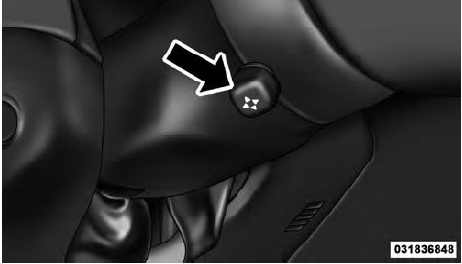
Power Tilt/Telescoping Steering Switch
To tilt the steering column, move the switch up or down as desired. To lengthen or shorten the steering column, pull the switch toward you or push the switch away from you as desired.
NOTE:
For vehicles equipped with Driver Memory
Seat, you can use your Remote Keyless Entry (RKE)
transmitter or the memory switch on the driver’s door
trim panel to return the tilt/telescopic steering column to
pre-programmed positions. Refer to “Driver Memory
Seat” in this section.
WARNING!
Do not adjust the steering column while driving.
Adjusting the steering column while driving or driving
with the steering column unlocked, could cause
the driver to lose control of the vehicle. Be sure the
steering column is locked before driving your vehicle.
Failure to follow this warning may result in
serious injury or death.
See also:
Check TPMS Warning
The “Tire Pressure Monitoring Telltale Light” will flash
on and off for 75 seconds and then remain on solid when
a system fault is detected. The system fault will also
sound a chime. If the ...
Power Window Switches
The control on the driver’s door has up/down switches
that give you fingertip control of all four power windows.
AUTO Power Window Switch
There is a single window control on the front and rear ...
Stowing the Crossbars
Reverse the procedure to stow the crossbars, again,
taking care to keep hand clear of pivoting joint. Crossbars
are identical and can be stowed in either rail nest. Once
the crossbars are stowed ...