
Controlling The Rear Climate Controls From The Front ATC Panel
The Three-Zone ATC system allows for adjustment of the rear climate controls from the front ATC panel.
To change the rear system settings:
1. Press REAR button to change control to rear control mode, Rear display (below) will appear. Control functions now operate rear system.
2. To return to Front screen, press REAR button again, or it will revert to the Front screen after six seconds.
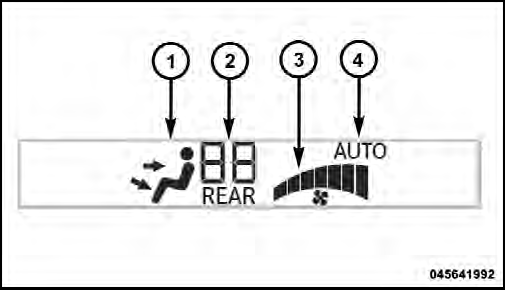
Front ATC Panel Rear Control Display
1. Mode Display
This display shows the current Mode selection.
2. Rear Temperature Display
This display shows the temperature setting for the rear seat occupants.
3. Blower Control Display
This display shows the current Blower speed selection.
4. Rear Auto Indicator
This indicates when the system is in Rear Auto mode.
See also:
Gear Ranges
DO NOT race the engine when shifting from PARK or
NEUTRAL into another gear range. ...
Supported Media (Disc Types)
The MP3 file recording media supported by the radio are
CDDA, CD-R, CD-RW, MP3, and CDDA+MP3. ...
Older Children And Child Restraints
Children who are two years old or who have outgrown
their rear-facing convertible child seat can ride forwardfacing
in the vehicle. Forward-facing child seats and
convertible child seats used in ...