
Tilt/Telescoping Steering Column
This feature allows you to tilt the steering column upward or downward. It also allows you to lengthen or shorten the steering column. The tilt/telescoping control handle is located below the steering wheel at the end of the steering column.
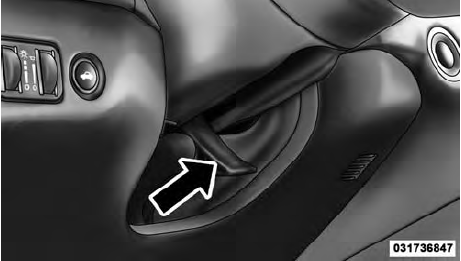
Tilt/Telescoping Control Handle
To unlock the steering column, pull the control handle down. To tilt the steering column, move the steering wheel upward or downward as desired. To lengthen or shorten the steering column, pull the steering wheel outward or push it inward as desired. To lock the steering column in position, push the control handle up until fully engaged.
WARNING!
Do not adjust the steering column while driving.
Adjusting the steering column while driving or driving with the steering column unlocked, could cause the driver to lose control of the vehicle. Be sure the steering column is locked before driving your vehicle.
Failure to follow this warning may result in serious injury or death.
See also:
After Starting
The idle speed will automatically decrease as the engine
warms up. ...
Trunk Lock And Release
The trunk lid can be released from inside the vehicle by
pressing the TRUNK RELEASE button located on the
instrument panel to the left of the steering wheel.
NOTE:
The transmission must be in PA ...
Styling Changes: More Effective than on the Sedan
Seeing it in the metal for the first time, we formed our initial reaction
that the 200’s new front and rear styling improve the convertible’s appearance
even more than the sedan’s, the latte ...