
SMS
Uconnect™ Phone can read or send new messages on your phone.
Your phone must support SMS over Bluetooth in order to use this feature. If the Uconnect™ Phone determines your phone is not compatible with SMS messaging over Bluetooth the “Messaging” button will be greyed out and the feature will not be available for use.
NOTE:
Uconnect™ Phone SMS is only available when
the vehicle is not in moving.

Read Messages:
If you receive a new text message while your phone is connected to Uconnect™ Phone, an announcement will be made to notify you that you have a new text message.

Once a message is received and viewed or listened to,
you will have the following options:
• Send a Reply
• Forward
• Call
Send Messages Using Soft-Keys:
You can send messages using Uconnect™ Phone. To send
a new message:
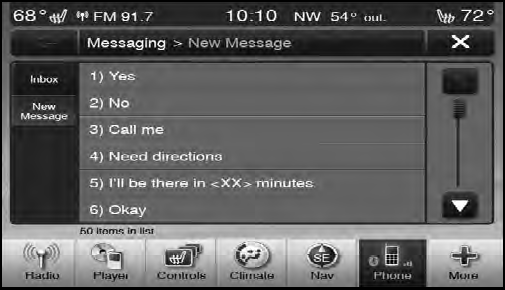
• Touch the “Phone” soft-key,
• Touch the “messaging” soft-key then “New Message”,
• Touch one of the 18 preset messages and the person
you wish to send the message to,
• If multiple numbers are available for the contact select
which number you would like to have the message
sent,
• Press “Send” or “Cancel”.
Send Messages Using Voice Commands:
• Press the  button,
• After the “Listening” prompt and the following beep,
say “Send message to John Smith mobile”,
• After the system prompts you for what message you
want to send, say the message you wish to send or say
“List”. There are 18 preset messages.
While the list of defined messages are being read, you can
interrupt the system by pressing the  button and
saying the message you want to send.
button and
saying the message you want to send.
After the system confirms that you want to send your message to John Smith, your message will be sent.
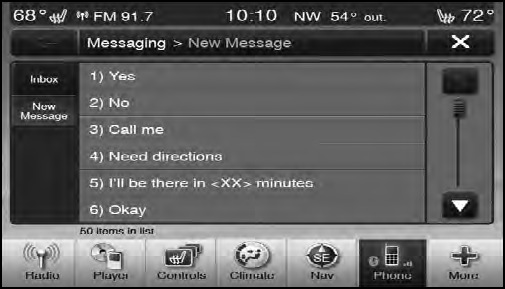
List of Preset Messages:
1. Yes.
2. No.
3. Okay.
4. I can’t talk right now.
5. Call me.
6. I’ll call you later.
7. I’m on my way.
8. Thanks.
9. I’ll be late.
10. I will be <number> minutes late.
11. See you in <number> minutes.
12. Stuck in traffic.
13. Start without me.
14. Where are you?
15. Are you there yet?
16. I need directions.
17. I’m lost.
18. See you later.
See also:
Driver And Passenger Advanced Front Air Bag
Inflator Units
The Driver and Passenger Advanced Front Air Bag
Inflator Units are located in the center of the steering
wheel and on the right side of the instrument panel.
When the ORC detects a collision requ ...
TUNE Control
Turn the rotary TUNE/SCROLL control knob clockwise
to increase or counterclockwise to decrease the frequency. ...
Six-Speed Automatic Transmission (C635) — If Equipped
The shift lever position display (located in the instrument
panel cluster) indicates the transmission gear range. You
must press the brake pedal to move the shift lever out of
the PARK position ...