
Electronic Vehicle Information Center (EVIC) — If Equipped
The Electronic Vehicle Information Center (EVIC) features a driver-interactive display that is located in the instrument cluster.
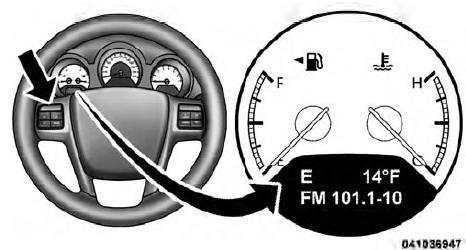
Electronic Vehicle Information Center (EVIC)
The EVIC consists of the following:
• Compass Heading Display (N, S, E, W, NE, NW, SE, SW)
• Mileage (Avg/MPG)
• Miles To Empty
• Low Tire Information (Tire Pressure Monitor System (TPMS) Displays) — if
equipped
• Timer
• Units
• System Warnings (Door Ajar, etc.)
• Personal Settings (Customer-Programmable Features)
• Outside Temperature Display (°F or °C)
• Audio Mode Displays – 12 preset Radio Stations or CD Title and Track number
when playing
The system allows the driver to select information by pressing the following buttons on the instrument panel switch bank located below the climate controls:

EVIC Steering Wheel Buttons

Press and release the MENU button to advance the display to each of the EVIC Main Menu features. Upon reaching the last item in the Main Menu the EVIC will advance to the first item in the Main Menu with the next MENU button press and release.

Press and release the DOWN button to advance the display through the various Trip Functions or Personal Settings.

Press and release the COMPASS button to display the compass heading, the outside temperature, and Audio Info (when the radio is on) screen when the current screen is not the compass, outside temp, audio info screen.

Press and release the SELECT Button to accept a selection. The SELECT Button also resets various Trip Functions.
See also:
Dialing Using The Mobile Phone Keypad
You can dial a phone number with your mobile phone
keypad and still use the Uconnect™ Phone (while dialing
via the mobile phone keypad, the user must exercise
caution and take precautionary sa ...
Tire Pressures For High Speed Operation
The manufacturer advocates driving at safe speeds
within posted speed limits. Where speed limits or conditions
are such that the vehicle can be driven at high
speeds, maintaining correct tire in ...
Base System
The Tire Pressure Monitor System (TPMS) uses wireless
technology with wheel rim mounted electronic sensors to
monitor tire pressure levels. Sensors, mounted to each
wheel as part of the valve st ...