
Display Settings
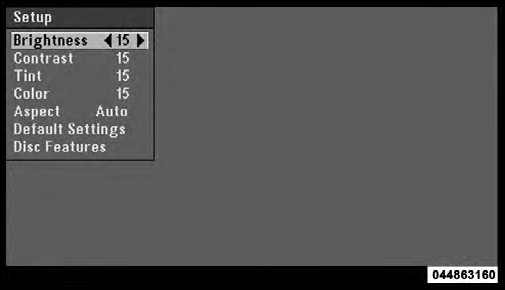
Video Screen Display Settings
When watching a video source (DVD Video with the disc in Play mode, Aux Video, etc.), pressing the remote control’s SETUP button activates the Display Settings menu. These settings control the appearance of the video on the screen. The factory default settings are already set for optimum viewing, so there is no need to change these settings under normal circumstances.
To change the settings, press the remote control’s navigation
buttons (  ,
,
 ) to select an item, then press the
remote control’s navigation buttons (
) to select an item, then press the
remote control’s navigation buttons (
 ,
,
 ) to change the
value for the currently selected item. To reset all values
back to the original settings, select the Default Settings
menu option and press the remote control’s ENTER
button.
) to change the
value for the currently selected item. To reset all values
back to the original settings, select the Default Settings
menu option and press the remote control’s ENTER
button.
Disc Features control the remote DVD player’s (if equipped) settings of DVD being watched in the remote player.
See also:
Full Size Spare – If Equipped
The full size spare is for temporary emergency use only.
This tire may look like the original equipped tire on the
front or rear axle of your vehicle, but it is not. This spare
tire may have limi ...
Customer Assistance For The Hearing Or Speech Impaired (TDD/TTY)
To assist customers who have hearing difficulties, the
manufacturer has installed special TDD (Telecommunication
Devices for the Deaf) equipment at its customer
center. Any hearing or speech imp ...
SAFETY
The 2011 300C has been named a Top Safety Pick by the Insurance Institute for
Highway Safety. For a car to earn this safety nod, it must receive the highest
score of Good in frontal-offset, side-i ...