
Using The Touch-Screen Radio Controls
1. Press the MENU hard-key on the radio faceplate.
2. Touch the Rear VES soft-key to display the Rear VES Controls. If a channel list is displayed, press the HIDE LIST soft-key to display the Rear VES Controls screen.

Rear VES Soft-key
3. Touch the 1 or 2 soft-key based on the channel you want to change and then the DISC soft-key in the MEDIA column. To exit touch the back arrow at the top left of the screen.
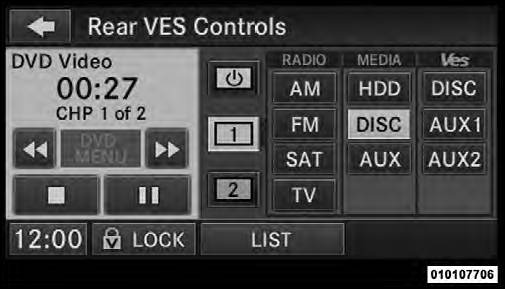
Select Channel/Screen 1 And DISC In The MEDIA Column
NOTE:
• To view a DVD on the radio press the RADIO/MEDIA
hard-key, on the radio faceplate, then touch the DISC
tab soft-key and then the VIEW VIDEO soft-key.
• Viewing a DVD on the Touch-Screen radio screen is
not available in all states/provinces, and the vehicle
must be stopped, and the shift lever must be in the
PARK position for vehicles with automatic transmission.
In vehicles with manual transmission the parking
brake must be engaged.
• Touching the screen on a Touch-Screen radio while a
DVD is playing brings up basic remote control functions
for DVD play such as scene selection, Play,
Pause, FF, RW, and Stop. Pressing the X in the upper
corner will turn off the remote control screen
functions.
See also:
Pinch Protect Override
If a known obstruction (ice, debris, etc.) prevents closing
the sunroof, press the switch forward and hold for two
seconds after the reversal occurs. This allows the sunroof
to move toward the c ...
Disposing Of Used Engine Oil And Oil Filters
Care should be taken in disposing of used engine oil and
oil filters from your vehicle. Used oil and oil filters,
indiscriminately discarded, can present a problem to the
environment. Contact yo ...
License Lamp
The license plate lamp is located under the tailgate light
bar and above the license plate.
1. Using a small screwdriver, press inward the locking
tab on the outboard side of the lamp assembly an ...