
Using The Remote Control
1. Press the MODE button on the Remote Control.
2. While looking at the video screen, highlight VES AUX 1 or 2 (depending which AUX input the gaming console is plugged into), by either pressing Up/Down/Left/ Right buttons or by repeatedly pressing the MODE button, then press ENTER on the Remote Control.
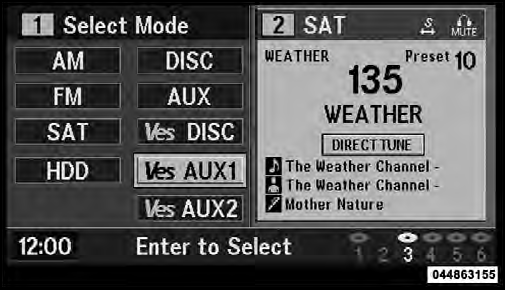
Select VES AUX1 Mode On The VES Screen
See also:
Clock Setting Procedure
1. Press and hold the TIME button until the hours blink.
2. Adjust the hours by turning the right side TUNE/
SCROLL control knob.
3. After adjusting the hours, press the right side TUNE/
SCROLL ...
Manual Park Release — 8 Speed Transmission (3.6L Engine)
WARNING!
Always secure your vehicle by fully applying the
parking brake, before activating the Manual Park
Release. Activating the Manual Park Release will
allow your vehicle to roll away if it ...
Operation Instructions - (Disc Mode For CD And MP3/WMA Audio Play,
DVD-Video)
The radio DVD player and many DVD discs are coded by
geographic region. These region codes must match in
order for the disc to play. If the region code for the DVD
disc does not match the region ...