
Supported MP3 File Formats
The radio will recognize only files with the *.MP3 extension as MP3 files. Non-MP3 files named with the *.MP3 extension may cause playback problems. The radio is designed to recognize the file as an invalid MP3 and will not play the file.
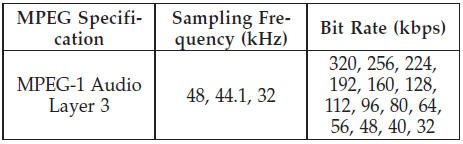
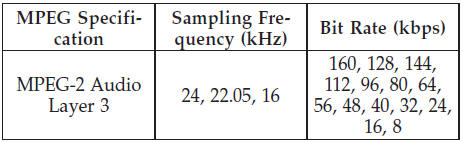
When using the MP3 encoder to compress audio data to an MP3 file, the bit rate and sampling frequencies in the following table are supported. In addition, variable bit rates (VBR) are also supported. The majority of MP3 files use a 44.1 kHz sampling rate and a 192, 160, 128, 96 or VBR bit rates.
ID3 Tag information for artist, song title, and album title are supported for version 1 ID3 tags. ID3 version 2 is not supported by the radios.
Playlist files are not supported. MP3 Pro files are not supported.
See also:
Hazard Warning Flashers
The Hazard Warning flasher switch is located in the
center of the instrument panel between the center air
outlets.
Press the switch to turn on the Hazard Warning
flashers. When the switch is ...
Floor Mat Safety Information
Always use floor mats designed to fit the footwell of your
vehicle. Use only floor mats that leave the pedal area
unobstructed and that are firmly secured so that they
cannot slip out of positio ...
Totally Integrated Power Module
The Totally Integrated Power Module is located in the
engine compartment near the battery. Refer to the applicable
“Engine Compartment” illustration in this section.
This center contains cart ...