
Second Row Stow ’n Go
On vehicles equipped with Stow ’n Go seats, the seats will fold and tumble in one motion.
1. Move the front seat fully forward.
2. Recline the front seatback fully forward.
3. Raise the armrests on the second row seat.
NOTE:
Seat will not stow in the storage bin unless the
armrests are raised.
4. Slide the storage bin locking mechanism to the “LOCK” position and then pull up on the storage bin latch to open the cover.
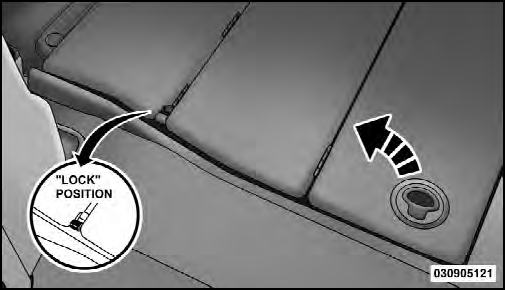
Storage Bin Cover Lock Release
5. Pull upward on the seatback recliner lever located on the outboard side of the seat.
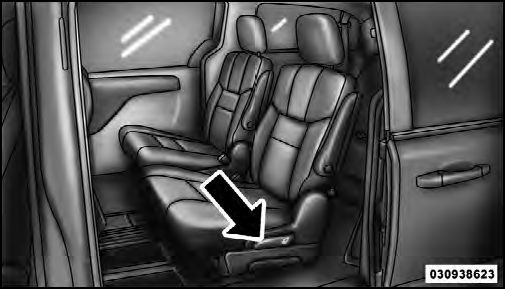
Seatback Recliner Lever, Seat Tumble, And Head Restraint Fold Lever
The non-adjustable head restraint and seatback will fold automatically during the seat tumble. No additional actuation is necessary.
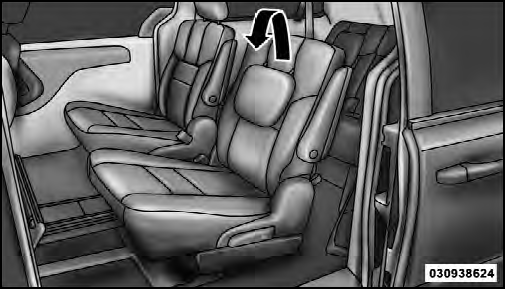
Non-Adjustable Head Restraint
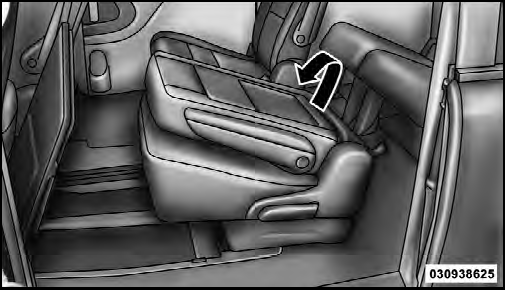
Automatic Folding Seatback
The seat will automatically tumble into position for easy storage.
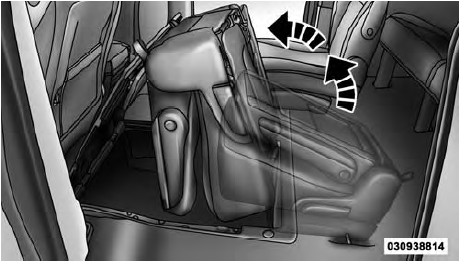
Tumbled Second Row Seat
6. Push the seat into the storage bin.

Seat In Storage Bin
7. Close the storage bin cover.
CAUTION!
The storage bin cover must be locked and flat to
avoid damage from contact with the front seat tracks,
which have minimal clearance to the cover.
WARNING!
In a collision, serious injury could result if the seat
storage bin covers are not properly latched.
• Do not drive the vehicle with the storage bin
covers open.
• Keep the storage bin covers closed and latched
while the vehicle is in motion.
• Do not use a storage bin latch as a tie down.
See also:
Overdrive Operation
The automatic transmission includes an electronically
controlled Overdrive (sixth gear). The transmission will
automatically shift into the Overdrive gear if the following
conditions are present ...
Towing Requirements
To promote proper break-in of your new vehicle drivetrain
components, the following guidelines are recommended:
CAUTION!
• Do not tow a trailer at all during the first 500 miles
(805 km) the n ...
Playback of MP3 Files
When a medium containing MP3 data is loaded, the
radio checks all files on the medium. If the medium
contains a lot of folders or files, the radio will take more
time to start playing the MP3 fi ...