
Compass Settings
After pressing the Compass Settings soft-key the following settings will be available.
• Variance
Compass Variance is the difference between Magnetic North and Geographic North. To compensate for the differences the variance should be set for the zone where the vehicle is driven, per the zone map. Once properly set, the compass will automatically compensate for the differences, and provide the most accurate compass heading.
NOTE:
Keep magnetic materials away from the top of
the instrument panel, such as iPod’s, Mobile Phones,
Laptops and Radar Detectors. This is where the compass
module is located, and it can cause interference with the
compass sensor, and it may give false readings.
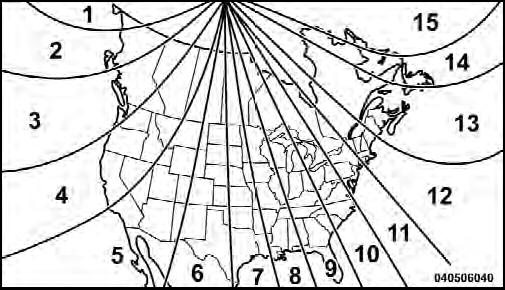
Compass Variance Map
• Perform Compass Calibration
Touch the Calibration soft-key to change this setting. This compass is self-calibrating, which eliminates the need to manually reset the compass. When the vehicle is new, the compass may appear erratic and the EVIC will display CAL until the compass is calibrated. You may also calibrate the compass by pressing the ON soft-key and completing one or more 360-degree turns (in an area free from large metal or metallic objects) until the CAL indicator displayed in the EVIC turns off. The compass will now function normally.
See also:
Venting Sunroof — Express
Press and release the “Vent” button, and the sunroof will
open to the vent position. This is called “Express Vent”,
and will occur regardless of sunroof position. During
Express Vent ope ...
Parade Mode (Daytime Brightness Feature)
Rotate the dimmer control upward to the first detent.
This feature brightens all text displays such as the
odometer, EVIC (if equipped), and radio when the parking
lights or headlights are on. ...
The Inside
Chrysler has been routinely criticized for its subpar interior quality, and
with good reason. One of the biggest issues has been blocky design and poor
materials quality. Both of those problems ha ...