
Electronic Vehicle Information Center (EVIC)
The Electronic Vehicle Information Center (EVIC) features a driver-interactive display that is located in the instrument cluster.
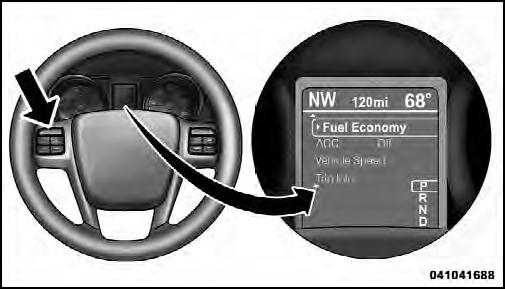
Electronic Vehicle Information Center (EVIC)
This system allows the driver to select a variety of useful
information by pressing the switches mounted on the
steering wheel. The EVIC consists of the following:
• Radio Info
• Fuel Economy Info
• Cruise Control Info
• Digital Vehicle Speed
• Trip Info
• Tire Pressure
• Vehicle Info
• Stored Warning Messages
• Turn Menu OFF
The system allows the driver to select information by pressing the following buttons mounted on the steering wheel:

EVIC Steering Wheel Buttons
UP Button

Press and release the UP button to scroll upward through the main menu and Vehicle Info and Trip Info sub-menus (Fuel Economy, Vehicle Info, Tire PSI, Cruise, Messages, Trip Info, Vehicle Speed, and Turn Menu OFF) and sub-menus.
DOWN Button

Press and release the DOWN button to scroll downward through the main menu and Vehicle Info and Trip Info sub-menus (Fuel Economy, Vehicle Info, Tire PSI, Cruise, Messages, Trip Info, Vehicle Speed, and Turn Menu OFF) and sub-menus.
SELECT Button

Press and release the SELECT button to access the information screens or sub-menu screens of a main menu item. Press and hold the SELECT button for two seconds to reset displayed/ selected features that can be reset.
BACK Button

Press the BACK button to return to the main menu from an info screen or sub-menu item.
See also:
Interior Care
Use MOPAR Fabric Cleaner or equivalent to clean fabric
upholstery and MOPAR Carpet Cleaner or equivalent
for carpeting.
Interior Trim should be cleaned starting with a damp
cloth, or MOPAR Sati ...
Bluetooth Streaming Audio (BTSA)
Music can be streamed from your cellular phone to the
Uconnect™ phone system.
Controlling BTSA Using Radio Buttons
To get into the BTSA mode, press either “AUX” button on
the radio or pres ...
Play A DVD Using The VES™ Player (If Equipped)
1. Insert the DVD with the label facing up. The VES™
player automatically selects the appropriate mode after
the disc is recognized and starts playing the DVD.
NOTE:
The VES™ player has basi ...