
Recent Calls
You may browse up to 34 of the most recent of each of the following call types:
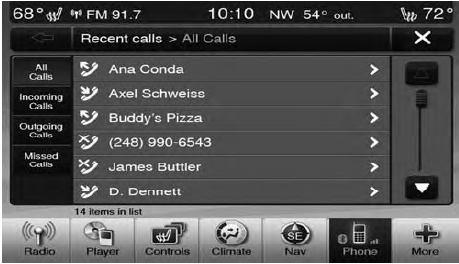
• Incoming Calls
• Outgoing Calls
• Missed Calls
• All Calls
These can be accessed by touching the “recent calls” soft-key on the Phone main screen.
You can also press the  button and
say “Show my
incoming calls” from any screen and the Incoming calls
will be displayed.
button and
say “Show my
incoming calls” from any screen and the Incoming calls
will be displayed.
NOTE:
Incoming can also be replaced with “Outgoing”,
“Recent” or “Missed”.
See also:
Tether Installation For Commercial Cargo Vehicles
To secure the child restraint upper tether strap to the
vehicle, follow the instructions shown:
1. Locate the child restraint tether anchor on the lower
rear of the front passenger seat.
2. Foll ...
Opening Sunroof — Manual Mode
To open the sunroof, press and hold the switch rearward
to full open. Any release of the switch will stop the
movement and the sunroof will remain in a partially
opened condition until the switc ...
Points To Remember
NOTE:
When the vehicle is stopped after a few miles (a
few kilometers) of operation, you may observe vapor
coming from the front of the engine compartment. This is
normally a result of moisture ...