
Emergency And Towing Assistance
The Emergency and Towing Favorite numbers can only
be altered. These cannot be deleted and the names cannot
be changed.
To change the Emergency or Towing number follow these
steps.
• Touch the “Phonebook” soft-key from the Phone main
screen.
• Touch the “Favorites” soft-key. Next scroll to the
bottom of the list to locate the Emergency and Towing
Favorites.
• Touch the + Options soft-key.
• Touch the + next to appropriate Favorite that is to be
altered.
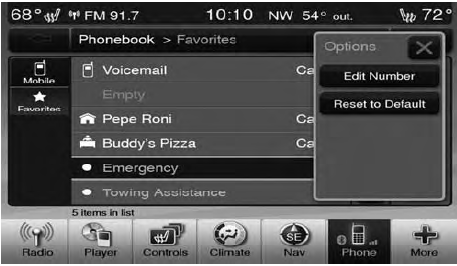
• The Options pop-up will appear and you can choose between Editing the number or resetting the number to default.
See also:
Maintenance-Free Battery
Your vehicle is equipped with a maintenance-free battery.
You will never have to add water, nor is periodic maintenance
required.
NOTE:
The battery is stored in a compartment behind
the left fr ...
Electronic Serial Number/Sirius Identification Number (ESN/SID)
Please have the following information available when
calling:
1. The Electronic Serial Number/Sirius Identification
Number (ESN/SID).
2. Your Vehicle Identification Number.
To access the ESN/SI ...
Supported Media (Disc Types)
The MP3 file recording media supported by the radio are
CDDA, CD-R, CD-RW, MP3, and CDDA+MP3. ...