
To Remove A Favorite
• To remove a Favorite, select phonebook from the
Phone main screen.
• Next select Favorites on the left side of the screen and
then touch the + Options soft-key.
• Touch the + next to the Favorite you would like to
remove.
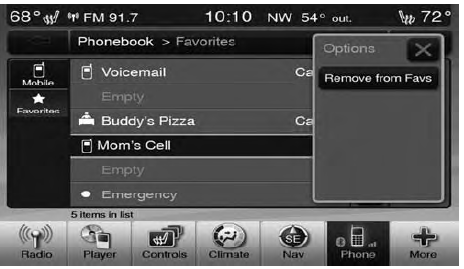
• The Options pop-up will display, touch “Remove from Favs”.
See also:
Knee Impact Bolster
The Knee Impact Bolster helps protect the knees of the
front passenger, and position the front occupant for the
best interaction with the Advanced Front Air Bag.
Along with seat belts and pretens ...
Rearming Of The System
The Vehicle Security Alarm will rearm itself after the 15
additional minutes of headlights and Vehicle Security
Light flashing, if the Vehicle Security Alarm has not been
disabled. If the condit ...
200 convertible
The 200 convertible weighs about 425 pounds more than the sedan — no small
amount — and it shows. Our test car's V-6, which Chrysler expects to power some
90 percent of convertibles, pulled we ...