
Trailer And Tongue Weight
Always load a trailer with 60% to 65% of the weight in the front of the trailer. This places 10% of the Gross Trailer Weight (GTW) on the tow hitch of your vehicle. Loads balanced over the wheels or heavier in the rear can cause the trailer to sway severely side to side which will cause loss of control of vehicle and trailer. Failure to load trailers heavier in front is the cause of many trailer collisions.
Never exceed the maximum trailer tongue weight stamped on your bumper or trailer hitch.
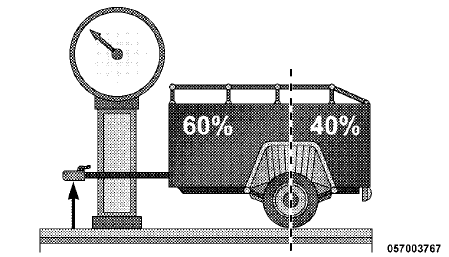
Consider the following items when computing the weight on the rear axle of the vehicle:
• The trailer tongue weight of the trailer.
• The weight of any other type of cargo or equipment put in or on your vehicle.
• The weight of the driver and all passengers.
NOTE:
Remember that everything put into or on the
trailer adds to the load on your vehicle. Also, additional
factory-installed options, or authorized dealer-installed
options, must be considered as part of the total load on
your vehicle. Refer to “Tire Safety Information/Tire and
Loading Information Placard” in “Starting and Operating”
for the maximum combined weight of occupants
and cargo for your vehicle.
CAUTION!
Incorrect trailer tongue weight could result in increased
yaw or vehicle instability. A negative trailer
tongue weight could unload the rear suspension of
the tow vehicle decreasing vehicle stability. Negative
trailer tongue weight could cause the trailer to squat
and potentially become disengaged from the tow
vehicle resulting in a runaway trailer condition.
See also:
Ethanol Fuel (E-85)
E-85 is a mixture of approximately 85% fuel ethanol and
15% unleaded gasoline.
WARNING!
Ethanol vapors are extremely flammable and could
cause serious personal injury. Never have any smoking
m ...
Power Steering Fluid Check
Checking the power steering fluid level at a defined
service interval is not required. The fluid should only be
checked if a leak is suspected, abnormal noises are
apparent, and/or the system is ...
Edit Uconnect™ Phonebook Entries
NOTE:
• Editing names in the phonebook is recommended
when the vehicle is not in motion.
• Automatic downloaded phonebook entries cannot be
deleted or edited.
• Press the button to
beg ...