
Notes On Playing MP3/WMA Files
The radio can play MP3/WMAfiles; however, acceptable MP3/WMAfile recording media and formats are limited.
When writing MP3/WMA files, pay attention to the following restrictions.
Supported Media (Disc Types)
The MP3/WMA file recording media supported by the radio are CDDA, CD-R, CD-RW, MP3,WMA, DVD Video, DVD-R, DVD-RW, DVD+R, DVD+RW, and CDDA+MP3.
Supported Medium Formats (File Systems)
The medium formats supported by the radio are ISO 9660 Level 1 and Level 2 and includes the Joliet extension.
When reading discs recorded using formats other than ISO 9660 Level 1 and Level 2, the radio may fail to read files properly and may be unable to play the file normally.
UDF and Apple HFS formats are not supported.
The radio uses the following limits for file systems:
• Maximum number of directory levels: 8
• Maximum number of files: 255
• Maximum number of folders: 100
• Maximum number of characters in file/folder names:
• Level 1: 12 (including a separator . and a threecharacter
extension)
• Level 2: 31 (including a separator . and a threecharacter
extension)
Multisession disc formats are supported by the radio.
Multisession discs may contain combinations of normal CD audio tracks and computer files (including MP3/ WMA files). Discs created with an option such as keep disc open after writing are most likely multisession discs. The use of multisession for CD audio or MP3/ WMA playback may result in longer disc loading times.
If a disc contains multi-formats, such as CD audio and MP3/WMA tracks, the radio will only play the MP3/ WMA tracks on that disc.
Supported MP3/WMA File Formats
The radio will recognize only files with the *.MP3/WMA extension as MP3/WMA files. Non-MP3/WMA files named with the *.MP3/WMA extension may cause playback problems. The radio is designed to recognize the file as an invalid MP3/WMA and will not play the file.
When using the MP3/WMA encoder to compress audio data to an MP3/WMA file, the bit rate and sampling frequencies in the following table are supported. In addition, variable bit rates (VBR) are also supported. The majority of MP3/WMAfiles use a 44.1 kHz sampling rate and a 192, 160, 128, 96 or VBR bit rates.
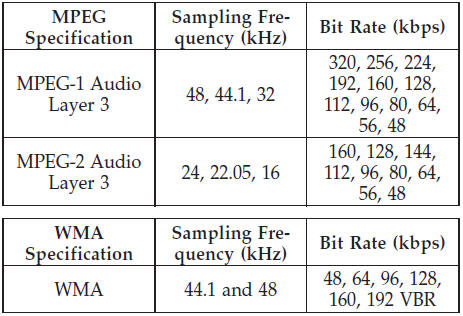
ID3 Tag information for artist, song title, and album title are supported for ID3 version 1 tags. ID3 version 2 is not supported by the radios.
Playlist files are not supported. MP3 Pro files are not supported.
Playback of MP3/WMA Files
When a medium containing MP3/WMA data is loaded, the radio checks all files on the medium. If the medium contains a lot of folders or files, the radio will take more time to start playing the MP3/WMA files.
Loading times for playback of MP3/WMA files may be
affected by the following:
• Media - CD-RW media may take longer to load than
CD-R media
• Medium formats - Multisession discs may take longer
to load than non-multisession discs
• Number of files and folders - Loading times will
increase with more files and folders
To increase the speed of disc loading, it is recommended to use CD-R media and single-session discs. To create a single-session disc, enable the “Disc at Once” option before writing to the disc.
See also:
Stowing the Crossbars
Reverse the procedure to stow the crossbars, again,
taking care to keep hand clear of pivoting joint. Crossbars
are identical and can be stowed in either rail nest. Once
the crossbars are stowed ...
Maintenance-Free Battery
Your vehicle is equipped with a maintenance-free battery.
You will never have to add water, nor is periodic maintenance
required.
NOTE:
The battery is stored in a compartment behind
the left fr ...
Cooling System – Drain, Flush, And Refill
If the engine coolant (antifreeze) is dirty or contains a
considerable amount of sediment, clean and flush with a
reliable cooling system cleaner. Follow with a thorough
rinsing to remove all de ...