
Keyless Enter-N-Go – If Equipped
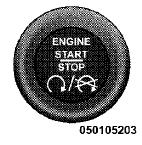
This feature allows the driver to operate the ignition switch with the push of a button, as long as the ENGINE START/STOP button is installed and the Remote Keyless Entry (RKE) transmitter is in the passenger compartment.
Installing And Removing The ENGINE START/STOP Button
Installing The Button
1. Remove the key fob from the ignition switch.
2. Insert the ENGINE START/STOP button into the ignition switch with the lettering facing up and readable.
3. Press firmly on the center of the button to secure it into position.
Removing The Button
1. The ENGINE START/STOP button can be removed from the ignition switch for key fob use.
2. Insert the metal part of the emergency key under the chrome bezel at the 6 o’clock position and gently pry the button loose.
NOTE:
The ENGINE START/STOP button should only
be removed or inserted with the ignition in the LOCK
position (OFF position for Keyless Enter-N-Go).
See also:
Enhanced Accident Response System
In the event of an impact causing air bag deployment, if
the communication network remains intact, and the
power remains intact, depending on the nature of the
event the ORC will determine wheth ...
To Vary The Speed Setting
When the Electronic Speed Control is set, you can increase
speed by pushing the RES (+) button. If the button
is continually pressed, the set speed will continue to
increase until the button is ...
Smartbeam™ — If Equipped
The SmartBeam™ system provides increased forward
lighting at night by automating high beam control
through the use of a digital camera mounted on the
inside rearview mirror. This camera detect ...