
Steering Wheel Audio Controls — If Equipped
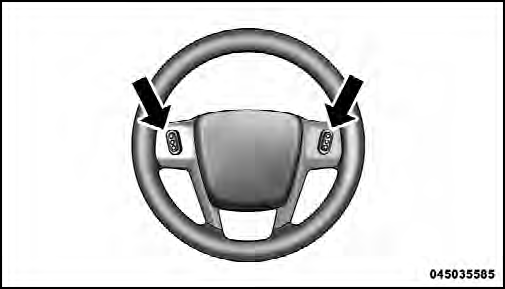
Remote Sound System Controls (Back View Of Steering Wheel)
The remote sound system controls are located on the rear surface of the steering wheel, at the three and nine o’clock positions.
The right-hand rocker switch has a pushbutton in the center, and controls the volume and mode of the sound system. Pressing the top of the rocker switch will increase the volume. Pressing the bottom of the rocker switch will decrease the volume. Pressing the center button changes the operation of the radio from AM to FM, or to CD mode, depending on which radio is in the vehicle.
The left-hand rocker switch has a pushbutton in the center. The function of the left-hand switch is different, depending on which mode you are in.
The following describes the left-hand rocker switch operation in each mode.
See also:
To Deactivate
Perform either of the following steps to deactivate the
SmartBeam™ system.
1. Select “Automatic High Beams — OFF” through the
EVIC. Refer to “Electronic Vehicle Information Center
(EV ...
Info Button (CD Mode For MP3 Play)
Pressing the INFO button repeatedly will scroll through
the following TAG information: Song Title, Artist, File
Name, and Folder Name (if available).
Press the INFO button once more to return to ...
Safety, Features & Pricing
Well over half the new 300's structure is made up of higher-strength steel
than before, Chrysler says, and the results show. With top scores in front, side
and rear impact crash tests, as well as ...