
Electronic Speed Control — If Equipped
When engaged, the Electronic Speed Control takes over accelerator operations at speeds greater than 25 mph (40 km/h).
The Electronic Speed Control buttons are located on the right side of the steering wheel.
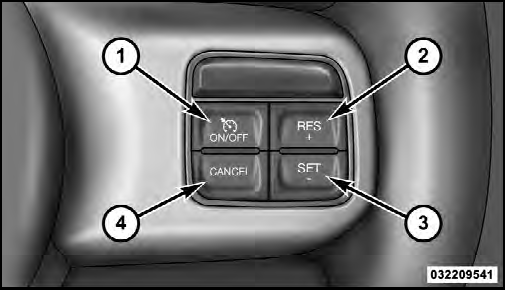
1 — ON/OFF
2 — RES +
4 — CANCEL
3 — SET -
NOTE:
In order to ensure proper operation, the Electronic
Speed Control System has been designed to shut down if
multiple Speed Control functions are operated at the same
time. If this occurs, the Electronic Speed Control System can
be reactivated by pushing the Electronic Speed Control
ON/OFF button and resetting the desired vehicle set speed.
See also:
Uconnect™ Phone Tutorial
To hear a brief tutorial of the system features, press the
button and say “Uconnect™ Tutorial.” ...
Rear Automatic Temperature Control (ATC) — If Equipped
The rearATC system has floor air outlets at the rear of the
right side sliding door, and overhead outlets at each
outboard rear seating position. The system provides
heated air through the floor ...
Towing Requirements – Trailer Lights And Wiring
Whenever you pull a trailer, regardless of the trailer size,
stoplights and turn signals on the trailer are required for
motoring safety.
The Trailer Tow Package may include a four and sevenpin
...