
Tilt/Telescoping Steering Column
This feature allows you to tilt the steering column upward or downward. It also allows you to lengthen or shorten the steering column. The tilt/telescoping lever is located below the steering wheel at the end of the steering column.
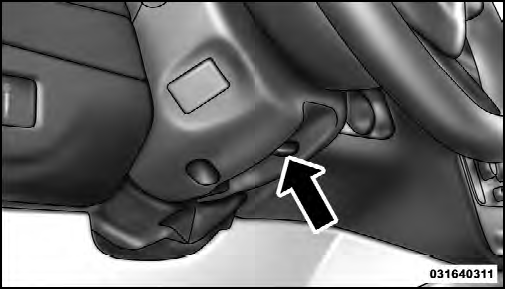
Tilt/Telescoping Lever
To unlock the steering column, push the lever downward (toward the floor). To tilt the steering column, move the steering wheel upward or downward as desired. To lengthen or shorten the steering column, pull the steering wheel outward or push it inward as desired. To lock the steering column in position, push the lever upward until fully engaged.
WARNING!
Do not adjust the steering column while driving.
Adjusting the steering column while driving or driving
with the steering column unlocked, could cause
the driver to lose control of the vehicle. Be sure the
steering column is locked before driving your vehicle.
Failure to follow this warning may result in
serious injury or death.
See also:
E-85 Usage In Non-Flex Fuel Vehicles
Non-FFV vehicles are compatible with gasoline containing
10% ethanol (E10). Gasoline with higher ethanol
content may void the vehicle’s warranty.
If a Non-FFV vehicle is inadvertently fueled wi ...
Auto Up Feature With Anti-Pinch Protection — If Equipped
The front driver and front passenger switches may be
equipped with an Auto Up feature. Lift the window
switch fully upward to the second detent, release, and the
window will go up automatically. ...
Rearming The System
If something triggers the alarm, and no action is taken to
disarm it, the Vehicle Security Alarm will turn off the
horn after three minutes, turn off all of the visual signals
after 15 minutes, ...