
Voice Tree
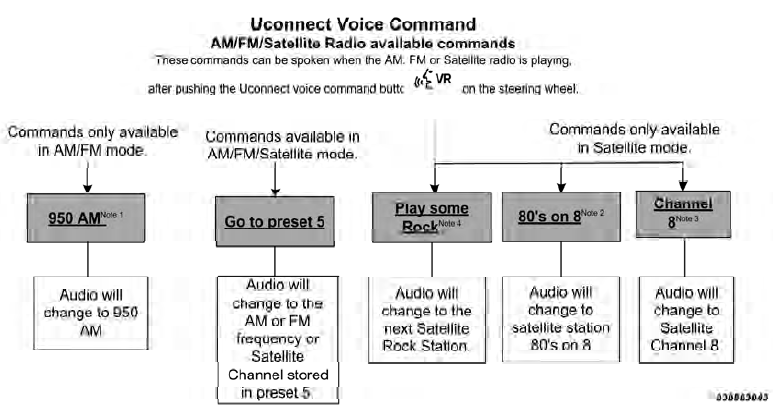
NOTE:
1. You can replace “950 AM” with any other AM or FM
frequency, such as “98.7 FM”.
2. You can replace “80’s on 8” with any other satellite
station name received by the radio.
3. You can replace “8” with any other satellite station
named received by the radio.
4. You can replace “rock” with any of the satellite music
types.
5. Available Voice Commands are shown in bold face
and shaded grey.
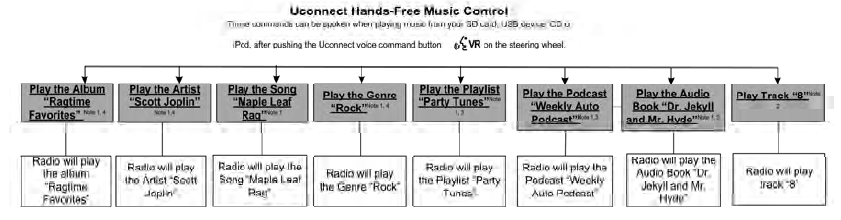
NOTE:
1. You can replace the album, artist, song, genre, playlist,
podcast and audio book names with any corresponding
names on the current device that is playing.
2. You can replace “8” with any track on the CD that is
currently playing. Command is only available when CD
is playing.
3. Playlist, Podcast and audio book commands are only
available when the iPod is connected and playing.
4. VR commands, Albums, Artists, and Genre names are
based on the music database provided by Gracenote.
5. Available Voice Commands are shown in bold face
and shaded grey.

NOTE:
1. You can replace “NFL” with any league shown on the
sports league screen. For example you can say “Show
MLB headlines” or “Show PGA headlines”.
2. You can replace “Headlines” with any menu items
shown on a league screen. For example you can say
“Show NFL Schedule and results” or “Show NCAA
Basketball AP top 25” or “Show Major League Baseball
Teams”.
3. You can also say “Show Current Weather” or “Show
extended weather” or “Show five day forecast” or “Show
ski info” to get other forecasts.
4. Available Voice Commands are shown in bold face
and shaded grey.
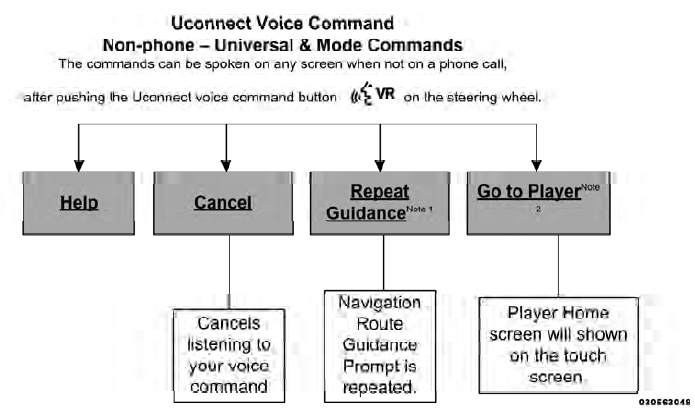
NOTE:
1. Only available with Navigation equipped vehicles.
2. You can replace “Player” with “Radio”, “Navigation”,
“Phone”, “Climate”, “More” or “Settings”.
3. Navigation commands only work if equipped with
Navigation.
4. Available Voice Commands are shown in bold face
and shaded grey.

NOTE:
1. You can also say “Find City”, “Find Favorite”, “Find
Play by Category”, “Find Play by Name”, “Find Recently
Found”, “Where to?” or “Go Home”.
2. You can say “Find Nearest” then “Restaurant”, “Fuel”,
“Transit”, “Lodging”, “Shopping”, “Bank”, “Entertainment”,
“Recreation”, “Attractions”, “Community”,
“Auto Services”, “Hospitals”, “Parking”, “Airport”, “Police
Stations”, “Fire Stations”, or “Auto Dealers”.
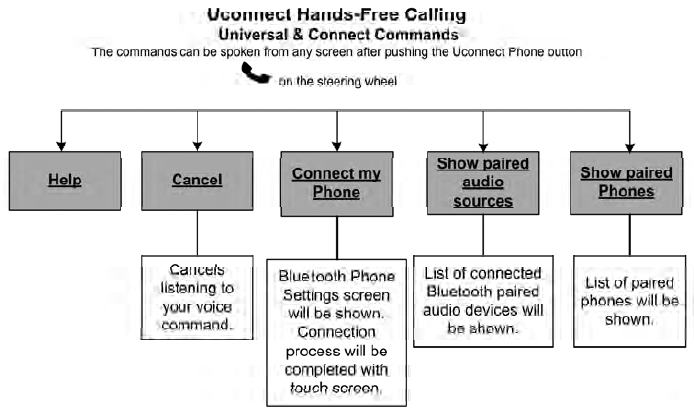
NOTE:
Available Voice Commands are shown in bold
face and shaded grey.
See also:
Three-Way Calling
To initiate three-way calling, press the
button while
a call is in progress, and make a second phone call, as
described under “Making a Second Call While Current
Call is in Progress”. Afte ...
Head Restraints
Head restraints are designed to reduce the risk of injury
by restricting head movement in the event of a rear
impact. Head restraints should be adjusted so that the top
of the head restraint is ...
Cooling System – Drain, Flush, And Refill
If the engine coolant (antifreeze) is dirty or contains a
considerable amount of sediment, clean and flush with a
reliable cooling system cleaner. Follow with a thorough
rinsing to remove all de ...