
Recent Calls
You may browse up to 34 of the most recent of each of the following call types:
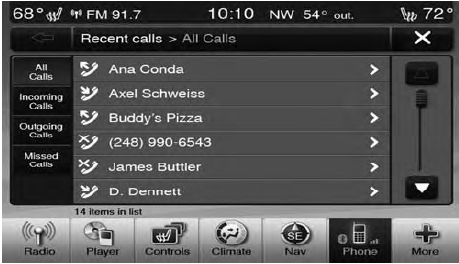
• Incoming Calls
• Outgoing Calls
• Missed Calls
• All Calls
These can be accessed by touching the “recent calls” soft-key on the Phone main screen.
You can also press the  button and
say “Show my
incoming calls” from any screen and the Incoming calls
will be displayed.
button and
say “Show my
incoming calls” from any screen and the Incoming calls
will be displayed.
NOTE:
Incoming can also be replaced with “Outgoing”,
“Recent” or “Missed”.
See also:
Storage Bin Safety Warning
Carefully follow these warnings to help prevent personal
injury or damage to your vehicle:
WARNING!
• Always close the storage bin covers when your
vehicle is unattended.
• Do not allow chi ...
Brake System
In order to assure brake system performance, all brake
system components should be inspected periodically.
Refer to the “Maintenance Schedule” for the proper
maintenance intervals.
WARNING!
...
Far End Audio Performance
• Audio quality is maximized under:
• low-to-medium blower setting,
• low-to-medium vehicle speed,
• low road noise,
• smooth road surface,
• fully closed windows,
• dry weat ...