
To Remove A Favorite
• To remove a Favorite, select phonebook from the
Phone main screen.
• Next select Favorites on the left side of the screen and
then touch the + Options soft-key.
• Touch the + next to the Favorite you would like to
remove.
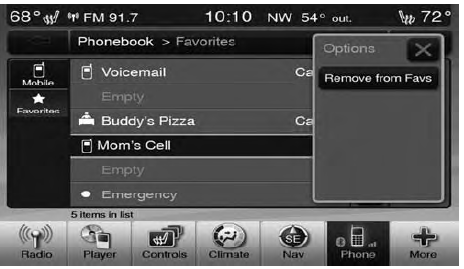
• The Options pop-up will display, touch “Remove from Favs”.
See also:
Front Seat Cupholders
The cupholders are located in the forward edge of the
center console.
Retractable Cover
Front Cupholders
Heated and Cooled Cupholders — If Equipped
Your vehicle may be equipped with heated ...
Service TPMS Warning
If a system fault is detected, the TPM Telltale Light will
flash on and off for 75 seconds and then remain on solid.
The system fault will also sound a chime. If the ignition
switch is cycled, th ...
Driver’s Automatic Dimming Mirror — If Equipped
The driver’s outside mirror will automatically adjust for
glare from vehicles behind you. This feature is controlled
by the inside automatic dimming mirror and can be
turned on or off by press ...