
Managing Your Favorite Phonebook
There are three ways you can add an entry to your Favorite Phonebook.
1. During an active call of a number to make a favorite, touch and hold a favorite button on the top of the phone main screen.
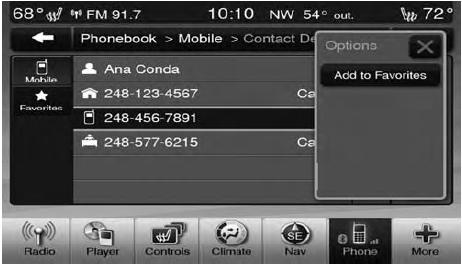
2. After loading the mobile phonebook, select phonebook from the Phone main screen, then select the appropriate number. Touch the + next to the selected number to display the options pop-up. In the pop-up select “Add to Favorites”.
NOTE:
If the Favorites list is full, you will be asked to
remove an existing favorite.
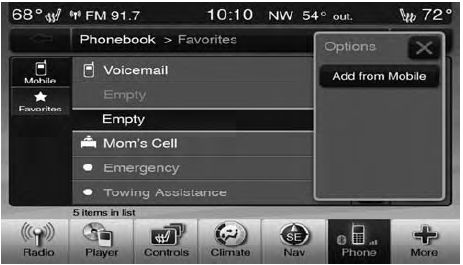
3. From the Phone main screen, select phonebook. From the phonebook screen, select the “Favorites” soft-key and then select the + soft-key located to the right of the phonebook record. Select an empty entry and touch the + on that selected entry. When the Options pop-up appears, touch “Add from Mobile”. You will then be asked which contact and number to choose from your mobile phonebook.
When complete the new favorite will be shown.
See also:
Electrical Power Outlets — If Equipped
Two 12 Volt (13 Amp) power outlets are located on the
lower instrument panel, below the open storage bin. The
driver-side power outlet is controlled by the ignition
switch and the passenger-side ...
To Enter Remote Start Mode
Press and release the REMOTE START button
on the RKE transmitter twice within five seconds.
The vehicle doors will lock, the parking
lights will flash and horn will chirp twice (if
programmed ...
Power Open/Close Left Power Sliding Door — If Equipped
Press the LEFT Power Sliding Door button twice on the
RKE transmitter within five seconds to Power Open/
Close the Left Power Sliding Door. If the button on the
RKE transmitter is pushed while t ...