
Pair (Link) Uconnect™ Phone To A Mobile Phone
To begin using your Uconnect™ Phone, you must pair your compatible Bluetooth enabled mobile phone.
To complete the pairing process, you will need to reference your mobile phone Owner’s Manual. The Uconnect™ website may also provide detailed instructions for pairing.
NOTE:
• You must have Bluetooth enabled on your phone to
complete this procedure.
• The vehicle must be in PARK.
1. Press the “Phone” soft-key on the screen to begin.
2. If there is no phone currently connected with the system, a pop-up will appear.
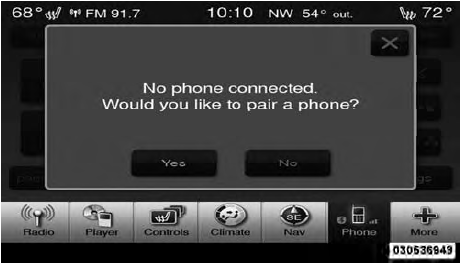
3. Select Yes to begin the pairing process. Then, search for available devices on your Bluetooth enabled mobile phone. When prompted on the phone, enter the name and PIN shown on the Uconnect Touch™ screen.
• If No is selected, touch the “Settings” soft-key from
the Uconnect™ Phone main screen,
• Touch the “Add Device” soft-key,
• Search for available devices on your Bluetooth
enabled mobile phone. When prompted on the
phone, enter the name and PIN shown on the
Uconnect Touch™ screen,
• See Step 4 to complete the process.
4. Uconnect™ Phone will display an in process screen while the system is connecting.
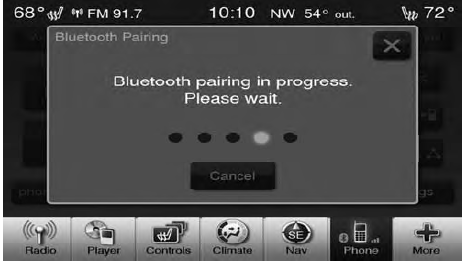
5. When the pairing process has successfully completed, the system will prompt you to choose whether or not this is your favorite phone. Selecting Yes will make this phone the highest priority. This phone will take precedence over other paired phones within range.
See also:
List All Names In The Uconnect™ Phonebook
• Press the button to begin.
• After the “Ready” prompt and the following beep, say
“Phonebook List Names”.
• The Uconnect™ Phone will play the names of all the
phonebook entrie ...
Cleaning Plastic Instrument Cluster Lenses
The lenses in front of the instruments in this vehicle are
molded in clear plastic. When cleaning the lenses, care
must be taken to avoid scratching the plastic.
1. Clean with a wet soft rag.Amil ...
Maintenance-Free Battery
Your vehicle is equipped with a maintenance-free battery.
You will never have to add water, nor is periodic maintenance
required.
NOTE:
The battery is stored in a compartment behind
the left fr ...