
Power Mirrors
The power mirror controls are located on the driver’s door trim panel.
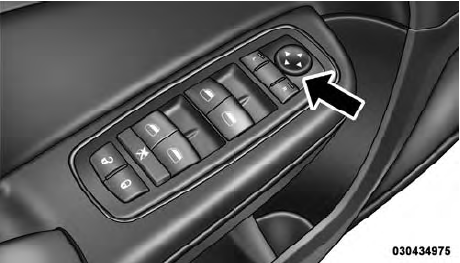
Power Mirror Control
The power mirror controls consist of mirror select buttons and a four-way mirror control switch. To adjust a mirror, press either the L (left) or R (right) button to select the mirror that you want to adjust.
NOTE:
A light in the select button will illuminate
indicating the mirror is activated and can be adjusted.
Using the mirror control switch, press on any of the four arrows for the direction that you want the mirror to move.
Power mirror preselected positions can be controlled by the optional Memory Seat Feature. Refer to “Driver Memory Seat” in “Understanding The Features Of Your Vehicle” for further information.
See also:
Automatic Locking Retractor Mode (ALR) — If Equipped
In this mode, the shoulder belt is automatically prelocked.
The belt will still retract to remove any slack in
the shoulder belt. The Automatic Locking Mode is available
on all passenger-seating ...
Hill Start Assist (HSA)
The HSA system is designed to assist the driver when
starting a vehicle from a stop on a hill. HSA will maintain
the level of brake pressure the driver applied for a short
period of time after t ...
Rain Sensing Wipers — If Equipped
This feature senses moisture on the windshield and automatically
activates the wipers for the driver. This feature is
especially useful for road splash or overspray from the
windshield washers o ...