
Preparations For Jump-Start
The battery in your vehicle is located between the left front headlight assembly and the left front wheel splash shield. To allow jump-starting there are remote battery posts located on the left side of the engine compartment.
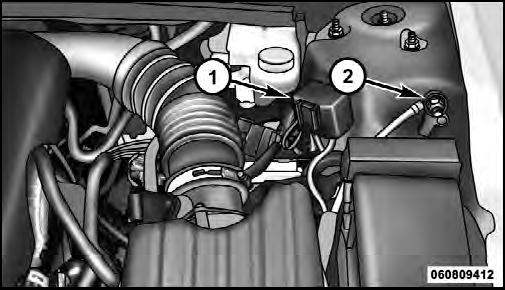
Remote Battery Posts
1 — Remote Positive (+) Post (covered with protective cap)
2 — Remote Negative (-) Post
WARNING!
• Take care to avoid the radiator cooling fan whenever
the hood is raised. It can start anytime the
ignition switch is on. You can be injured by
moving fan blades.
• Remove any metal jewelry such as watch bands or bracelets that might make an inadvertent electrical contact. You could be seriously injured.
• Batteries contain sulfuric acid that can burn your skin or eyes and generate hydrogen gas which is flammable and explosive. Keep open flames or sparks away from the battery.
1. Set the parking brake, shift the automatic transmission into PARK and turn the ignition to LOCK.
2. Turn off the heater, radio, and all unnecessary electrical accessories.
3. Remove the protective cover over the remote positive (+) battery post. To remove the cover, press the locking tab and pull upward on the cover.
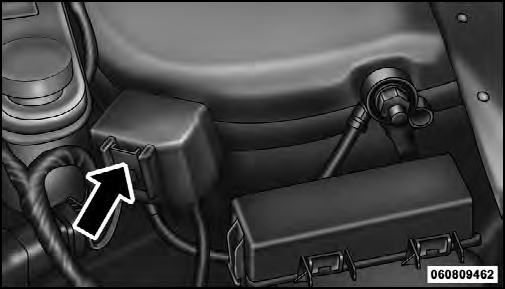
Locking Tab
4. If using another vehicle to jump-start the battery, park the vehicle within the jumper cables reach, set the parking brake and make sure the ignition is OFF.
WARNING!
Do not allow vehicles to touch each other as this
could establish a ground connection and personal
injury could result.
See also:
Selection Of Engine Oil For Flexible Fuel Vehicles (E-85) And Gasoline
Vehicles
FFV vehicles operated on E-85 require specially formulated
engine oils. These special requirements are included
in MOPAR engine oils, and in equivalent oils meeting
Chrysler Specification MS-639 ...
Anti-Lock Brake System (ABS)
This system aids the driver in maintaining vehicle control
under adverse braking conditions by controlling hydraulic
brake pressure. This prevents wheel lock-up to help
avoid skidding on slipper ...
World-class Manufacturing (WCM) Transforms Brampton to Launch the All-new
Chrysler 300 Sedans
For the Brampton plant, the launch of the Chrysler brand's all-new flagship
sedan had to be nothing less than world class.
In preparation for the launch of the Chrysler 300 series sedans, employee ...