
Towing A Disabled Vehicle
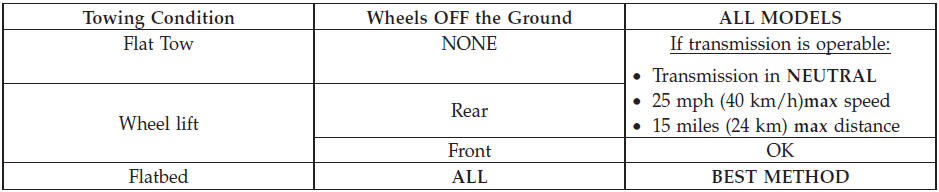
Proper towing or lifting equipment is required to prevent damage to your vehicle. Use only tow bars and other equipment designed for the purpose, following equipment manufacturer’s instructions. Use of safety chains is mandatory. Attach a tow bar or other towing device to main structural members of the vehicle, not to bumpers or associated brackets. State and local laws applying to vehicles under tow must be observed.
If you must use the accessories (wipers, defrosters, etc.) while being towed, the ignition must be in the ON/RUN position, not the ACC position.
CAUTION!
• Do not use sling type equipment when towing.
Damage to the fascia will occur.
• When securing the vehicle to a flatbed truck, do
not attach to front or rear suspension components.
Damage to your vehicle may result from improper
towing.
• Do not push or tow this vehicle with another
vehicle as damage to the bumper fascia and transmission
may result.
• If the vehicle being towed requires steering, the
ignition switch must be in the ON/RUN position,
not the LOCK or ACC positions.
The manufacturer recommends towing your vehicle with all four wheels OFF the ground using a flatbed. If flatbed equipment is not available, and the transmission is operable, the vehicle may be flat towed (with all four wheels on the ground) under the following conditions:
• The shift lever must be in NEUTRAL.
• The towing distance to be traveled must not exceed 15 miles (24 km).
• The towing speed must not exceed 25 mph (40 km/h).
If the transmission is not operable, or the vehicle must be towed faster than 25 mph (40 km/h) or farther than 15 miles (24 km), it must be towed with the front wheels OFF the ground (using a flatbed truck, or wheel lift equipment with the front wheels raised).
CAUTION!
Towing faster than 25 mph (40 km/h) or farther than
15 miles (24 km) with front wheels on the ground can
cause severe damage to the transmission. Such damage
is not covered by the New Vehicle Limited Warranty.
See also:
Be Reasonable With Requests
If you list a number of items and you must have your
vehicle by the end of the day, discuss the situation with
the service advisor and list the items in order of priority.
At many authorized deal ...
Gross Trailer Weight (GTW)
The GTW is the weight of the trailer plus the weight of all
cargo, consumables and equipment (permanent or temporary)
loaded in or on the trailer in its loaded and
ready for operation condition. ...
Power Steering
The standard power steering system will give you good
vehicle response and increased ease of maneuverability
in tight spaces. The system will provide mechanical
steering capability if power assi ...