
Electronic Range Select (ERS) Operation
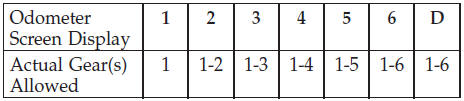
The Electronic Range Select (ERS) shift control allows the driver to limit the highest available gear when the shift lever is in the DRIVE position. For example, if you shift the transmission into 3 (third gear), the transmission will never shift above third gear, but will shift down into second and first gear normally.
You can switch between DRIVE and ERS mode at any vehicle speed. When the shift lever is in the DRIVE position, the transmission will operate automatically, shifting between all available gears. Tapping the shift lever to the left (-) will activate ERS mode, display the current gear in the instrument cluster, and maintain that gear as the top available gear. Once in ERS mode, tapping the shift lever to the left (-) or right (+) will change the top available gear.
To exit ERS mode, simply press and hold the shift lever to the right (+) until “D” is once again displayed in the shift lever position indicator in the instrument cluster.
WARNING!
Do not downshift for additional engine braking on a
slippery surface. The drive wheels could lose their
grip and the vehicle could skid, causing an accident
or personal injury.
NOTE:
To select the proper gear position for maximum
deceleration (engine braking), tap the shift lever to the
left (-) repeatedly as the vehicle slows. The transmission
will shift to the range from which the vehicle can best be
slowed down.
See also:
Conference Call
When two calls are in progress (one active and one on
hold), press and hold the button
until you hear a
double beep indicating that the two calls have been
joined into one conference call. ...
Distance To Empty (DTE)
Shows the estimated distance that can be traveled with
the fuel remaining in the tank. This estimated distance is
determined by a weighted average of the instantaneous
and average fuel economy, ...
Troubleshooting Tips
If you are having trouble programming HomeLink , here
are some of the most common solutions:
• Replace the battery in the original hand-held transmitter.
• Press the LEARN button on the Garage ...