
Keyless Enter-N-Go – If Equipped
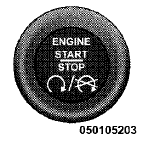
This feature allows the driver to operate the ignition switch with the push of a button, as long as the ENGINE START/STOP button is installed and the Remote Keyless Entry (RKE) transmitter is in the passenger compartment.
Installing And Removing The ENGINE START/STOP Button
Installing The Button
1. Remove the key fob from the ignition switch.
2. Insert the ENGINE START/STOP button into the ignition switch with the lettering facing up and readable.
3. Press firmly on the center of the button to secure it into position.
Removing The Button
1. The ENGINE START/STOP button can be removed from the ignition switch for key fob use.
2. Insert the metal part of the emergency key under the chrome bezel at the 6 o’clock position and gently pry the button loose.
NOTE:
The ENGINE START/STOP button should only
be removed or inserted with the ignition in the LOCK
position (OFF position for Keyless Enter-N-Go).
See also:
Instrument Cluster — Premium
Instrument Cluster — Premium ...
Chrysler Group LLC Customer Center
P.O. Box 21–8004
Auburn Hills, MI 48321–8004
Phone: (800) 247–9753 ...
Seat Belts And Pregnant Women
We recommend that pregnant women use the seat belts
throughout their pregnancy. Keeping the mother safe is
the best way to keep the baby safe.
Pregnant women should wear the lap part of the belt ...